
Thikra Blog shares smart living tips, home gadget updates, and lifestyle technology insights tailored for UAE readers.
Physical media and on-device music are making a comeback. A few instances of artists pulling their catalog from music streaming services can be all it takes to push people to try owning their music again. In addition to streaming, I play music on vinyl records, CDs, cassettes, and MP3 players. I get asked a simple question every time someone expresses an interest in the world of physical media: Where do you even find music to buy these days?
Believe it or not, digital marketplaces like iTunes and Amazon Music are still around, and they’re great options for purchasing digital files. But there’s a better way—CDs. They’re affordable, easy to find, and you can rip lossless digital audio files from them. Now that computers with optical drives are all but extinct, the best way to turn your CD collection into lossless digital media is with a standalone, portable CD player.
Why hardware is simpler for CD ripping than software
No need to worry about dongles, apps, or copy protection

Using your computer to rip CDs and burn new ones was easy with software in the early days of MP3 players. Nearly every machine, whether a laptop or desktop, had an optical drive that could read and write to compact discs. Moreover, most people interested in CD ripping already had iTunes installed on their computers. iPods held more than three-quarters of the MP3 player market in the U.S. at their peak, and iTunes was the official software used to sync music to them.
Jumping back to 2025, the situation couldn’t be more different now. Optical drives aren’t common on laptops or desktops, and even external USB optical drives are hard to find. In terms of software, you’re more likely to have your favorite streaming service’s app installed on your Mac and PC than a CD-ripping tool. That includes mainstream options like iTunes (or the Music/Finder apps on modern macOS versions).
In many jurisdictions, copying or “ripping” music from CDs you own for personal use is generally considered to be acceptable. However, it can be a legal gray area, so check the rules for your region before proceeding.
Let’s say you have the hardware needed to rip CDs to your computer. It probably includes a few dongles and third-party software, like Exact Audio Copy or dbPoweramp. There are still pain points, like running into pesky copy-protection software on certain discs that prevents ripping, or having to pay for a service like dbPoweramp.
That’s why, instead of using dongles, purchasing an external optical drive, and downloading software, you should buy a standalone CD player that handles it all on its own.
All the ways you can rip CDs with Fiio’s DM13
It’s a portable player, standalone CD ripper, and much more
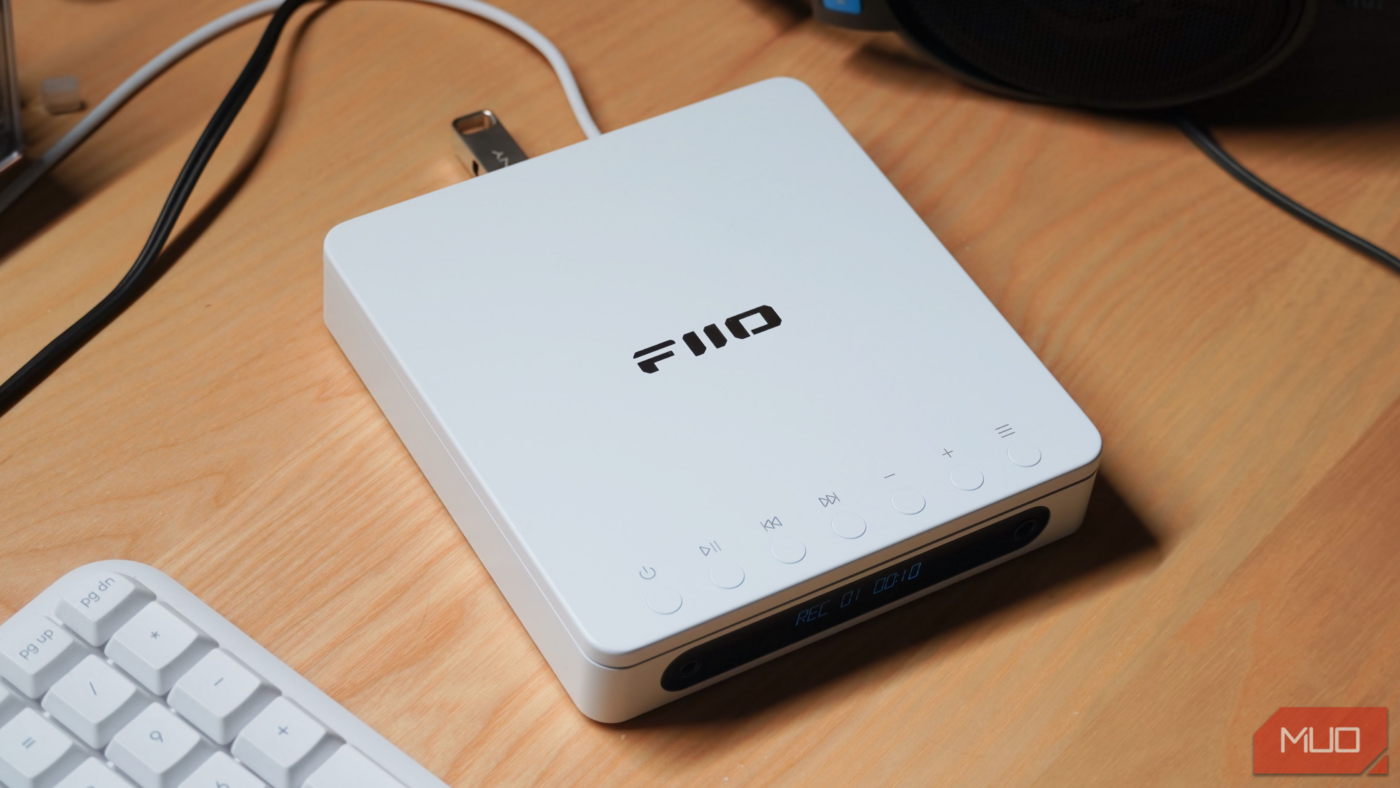
I stumbled upon Fiio’s DM13 portable CD player nearly a year ago while looking for a modern, feature-rich way to play my growing CD collection. It has been my go-to player ever since. However, after getting tired of having to keep an old iMac around for CD ripping, I decided it was time to put the Fiio DM13 to the test. Imagine my surprise when I learned this player can rip lossless audio files straight to a USB drive — no computer or app necessary.
The way it works is simple. There are two USB-C ports on the back, labeled USB REC and POWER IN. To start ripping a CD, load it into the tray, connect your flash drive to the POWER IN port, and connect a 5W USB-C charger to the USB REC port. That sounds the opposite of what it should be, but in the context of the Fiio DM13, CD ripping is different than CD recording.

After using the menu buttons to switch the player to the USB OUT mode, you can start ripping your CD into individual lossless WAV files for each track, complete with metadata. When finished, unplug the flash drive, and the rip is complete. You can plug it into a computer to transfer the album’s contents to your music library, or plug it straight into a phone or music player to start listening immediately.
It’s important to note that the Fiio DM13 also supports track recording. This means you can hook the player up to a computer with software like iTunes or Exact Audio Copy for a more advanced rip, but you don’t have to. It’s a complete portable CD player with a built-in rechargeable battery as well, so it can handle all your CD playback needs.
Why you should (and shouldn’t) rip with this accessory
There are notable limitations, but I think the benefits outweigh them

There are a few drawbacks to using the Fiio DM13 as a standalone audio ripper. For starters, it can only rip in real time, so a 55-minute CD will take 55 minutes to rip. That could be a dealbreaker for some, since solid optical drives can rip CDs at up to 10x speed with relative ease. For bulk collection rips, this kind of accessory might slow you down.
It’s also worth noting that you can’t listen to your CD while ripping—the Fiio DM13 supports recording and playback, but not at the same time.
With these compromises in mind, the Fiio DM13 still stands out as the easiest way to rip CDs in 2025. This accessory handles all the complicated parts for you, recording straight to a simple USB stick, without forcing you to re-learn how to rip on macOS and Windows. Retailing for between $100 and $200, depending on the model, it’s well worth the price if you want a versatile, multi-function CD player and ripper.
source
Note: All product names, brands, and references in this post belong to their respective owners.
For more smart home guides, lifestyle tech updates, and UAE-focused recommendations, visit blog.thikra.co.
To shop smart gadgets, accessories, and lifestyle electronics, explore Thikra Store at thikra.co.

Leave a Comment