
Thikra Blog shares audio gear reviews, wearable tech updates, and device guides to help UAE users choose the best earbuds, headphones, and smartwatches.
The JBL Boombox 4 is finally here, and JBL didn’t just make minor tweaks this time. With a revised driver layout, higher wattage, Auracast support, and a swappable battery pack, it’s a far bigger shift from the Boombox 3 than you might expect. So the real question is: did JBL meaningfully improve one of the most popular boombox-style speakers on the market or mess with a good thing? Let’s find out in this JBL Boombox 4 review.
This article was published on December 6, 2025, and is the first version of the article.
About this JBL Boombox 4 review: We tested the JBL Boombox 4 over a period of 1 week. It was running firmware version 25.29.10, and the JBL Portable app ran version v6.8.30. The company provided the unit for this review.
The JBL Boombox 4 is ideal for any listener seeking a loud, durable, and outdoor-ready party speaker in the traditional boombox form, without investing in a full-on PartyBox.
What’s it like to use the JBL Boombox 4?

Harley Maranan / SoundGuys
The Boombox 4 is almost 2lbs lighter than the Boombox 3.
The JBL Boombox 4 is slightly lighter than its predecessor, weighing approximately 2 pounds less than the Boombox 3. The metal handle has been replaced with a plastic one that’s integrated into the rest of the unit, and JBL has also beefed up the rubber bumpers around the passive radiators. With an IP68 rating and a flatter, more stable base, the Boombox 4 feels even more ready for a backyard party, pool day, or rainy camping trip. The camo-and-orange “Squad” finish does give off Teenage Mutant Ninja Turtles energy, which I’m here for, but it’s also available in black and navy if you want something more subtle.
Under the hood, the changes are even more significant. The Boombox 3 uses a three-way setup with a dedicated subwoofer, two midrange drivers, two tweeters, and dual passive radiators. The Boombox 4 switches to two 5-inch woofers and two 0.75-inch tweeters, supported by three passive radiators, with the third facing the rear. This redesign helps reduce weight while letting the larger woofers take over more of the low-end work.
Power also gets a bump, and it’s something worth noting. The Boombox 3 offers up to 180W when plugged in, while the Boombox 4 reaches roughly 210W. The kicker is that the gap becomes even more noticeable on battery power. The Boombox 3 drops to about 136W, while the Boombox 4 still delivers close to 200W. That is a significant real-world difference, especially for outdoor listening where every watt counts.
Another notable upgrade is the swappable battery pack. The Boombox 4 uses the same battery as the PartyBox 520, so you can keep a spare on hand for longer off-grid listening. There is still nothing subtle about the Boombox; it won’t fit in a backpack, but the lighter design makes it easy to carry with one hand, and it has no problem powering a crowd.
What are the key features of the JBL Boombox 4?
It’s worth downloading the JBL Portable app to get the most out of the Boombox 4. This is where you’ll find the visual toggle for the Deep and Punchy bass modes, along with a 7-band custom EQ, allowing you to tailor the sound to your liking. You can also manage any Auracast-linked speakers from the same dashboard, or pair a second Boombox 4 for stereo performance, if you happen to have one.
The app is also where you’ll find the “Playtime Boost” feature, which aims to extend battery life. It’s essentially an EQ preset that reduces bass strength, preventing the speaker from working as hard and therefore helping it run longer. It doesn’t sound super great. Personally, I prefer carrying a battery bank rather than using Playtime Boost, since the reduced bass isn’t worth it for me.
How does the JBL Boombox 4 connect?

The Boombox 4 does not feature a 3.5mm input, but it does offer audio over USB-C.
The JBL Boombox 4 connects to your device wirelessly via Bluetooth 5.4, supporting SBC, LC3, and AAC codecs. Unfortunately, it no longer includes a 3.5mm aux input, but it now offers audio over USB-C, including lossless audio. Additionally, that same USB-C port can also charge your phone.
Pairing the JBL Boombox 4 is easy and follows the usual steps.
- Turn on the Boombox 4 and press the Bluetooth button
- Open Bluetooth settings on your device
- Select Boombox 4
- Download and install the JBL Portable app for further control
How long does the JBL Boombox 4’s battery last?
The JBL Boombox 4 advertises up to 28 hours of battery life on a single charge (up from the Boombox 3’s 24 hours, and not including Playtime Boost). In our testing, playing a consistent source of music samples at 80dB measured from one metre away with Deep Bass mode engaged, the Boombox 4 exceeded that claim and lasted 34 hours and 56 minutes. Not bad!
Keep in mind the Boombox 4’s higher wattage because 80dB isn’t a demanding output level for a speaker of this size. Still, with the swappable battery system, and assuming you’re not consistently maxing out the volume, you can expect plenty of real-world use. But if you’re blasting bass-heavy EDM at full volume, that number will drop. The harder your speaker has to work, the faster the battery will drain.
How does the JBL Boombox 4 sound?
Reviewer’s notes
Editor’s note: this review uses a hover-enabled glossary to describe sound quality based on a consensus vocabulary. You can read about it here.
No. The JBL Boombox 4 does not contain a built-in microphone.
Should you buy the JBL Boombox 4?

Harley Maranan / SoundGuys
The JBL horn glows orange when “Deep Bass” mode is engaged.
If you’re after a big, bold boombox-style speaker with plenty of output and bass strength, the Boombox 4 certainly fits the bill. Its lighter design, better sound, and swappable battery pack make it a great choice for tailgaters, backyard barbecues, and off-grid camping trips. This isn’t a Bluetooth speaker for your living room. It is built to be loud, rugged, and fun.
You’re definitely paying the JBL premium here, but you get excellent build quality, Auracast support, a more customizable sound than the Boombox 3, and noticeably higher wattage when unplugged. The Boombox 4 delivers thunderous low-end performance in a package that’s still relatively portable, and if that’s what you value most, it won’t disappoint. The Boombox 3 still holds up well and is worth considering if you find it at a meaningful discount, but the Boombox 4 is the better performer overall.
If you prioritize value, there are more affordable options available. However, if you’re looking for a durable outdoor boombox with substantial power, long battery life, and modern connectivity, the Boombox 4 remains one of the stronger choices in its class.
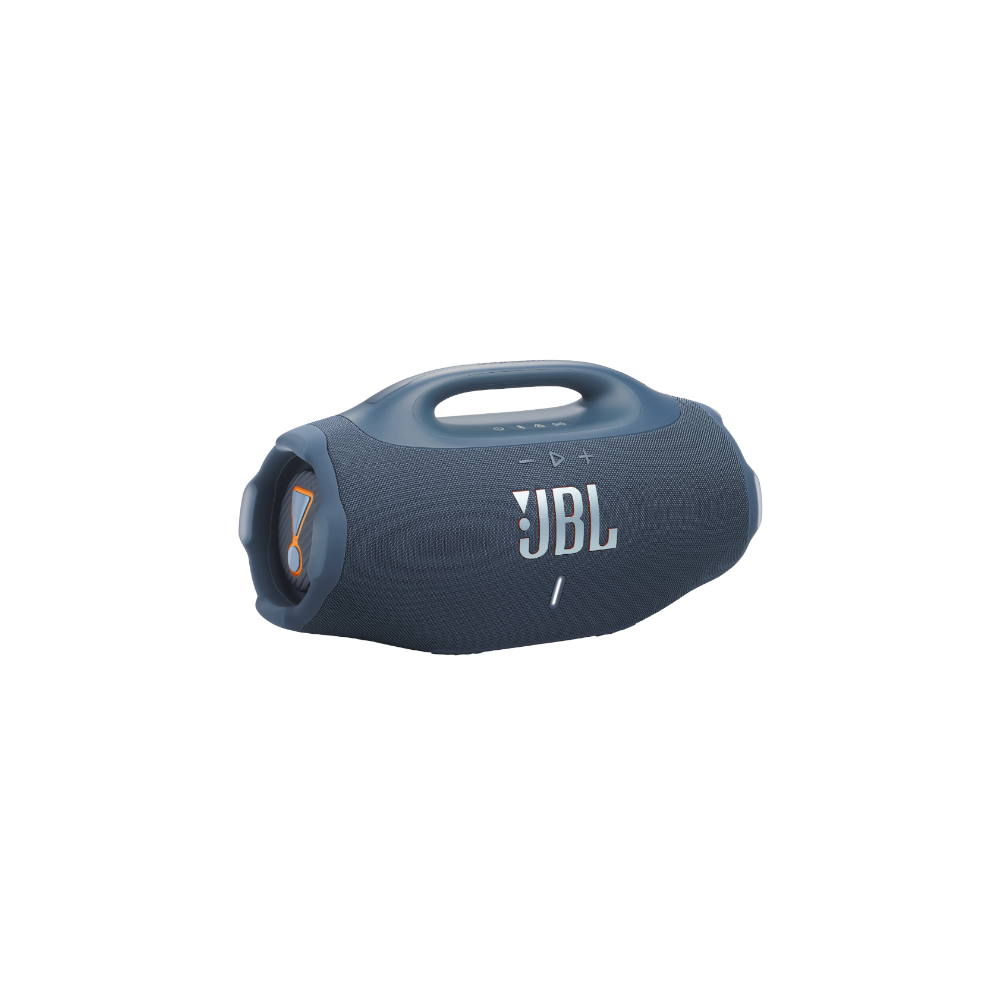
IP68 • Loud output • 7-band EQ • Lighter than the BB3 • Audio over USB
Durable and loud with plenty of bass, the JBL Boombox 4 is the ideal choice for outdoor listening when volume counts.
What should you get instead of the JBL Boombox 4?

Harley Maranan / SoundGuys
The PartyBox Stage 320 now features a single, conjoined light ring instead of two separate ones.
While the JBL Boombox 4 can certainly get a crowd moving, you may want to spend an extra $50 and step up to the JBL PartyBox Stage 320 ($599.95 at Amazon) if you need more party power. With up to 240W of output, a dual-woofer design that provides plenty of bass, a customizable built-in light show, and 1/4-inch inputs for a mic or guitar, the PartyBox Stage 320 delivers a lot of party perks for not much more money. Thanks to its telescopic handle and wheels, it’s not too much of a hassle to move around either.

The Sony ULT Field 7 offers a 1/4″ input for a microphone or a guitar.
Otherwise, if you’re after a portable party powerhouse, the Sony ULT Field 7 ($498 at Amazon) is also worth a look. It offers a few party-friendly features the Boombox 4 doesn’t, including a 3.5mm aux input, a 1/4-inch input, and built-in customizable lighting rings around its passive radiators. Engaging ULT 2 mode delivers solid bass strength for its size, and its IP67 rating keeps it protected from the elements. However, it doesn’t offer swappable battery packs.
Frequently asked questions
Yes, you can use the JBL Boombox 4 while charging. Keeping the AC cable attached will both charge the battery and provide you with optimal performance.
No. The JBL Boombox 4 does not feature an AUX in. However, it does offer audio over USB-C.
The JBL Boombox 4 isn’t designed to be used with a TV, but it can technically connect if your TV offers a Bluetooth connection, or audio over USB-C.
The JBL Boombox 4 provides stereo playback with a driver setup that includes two 5-inch woofers for low-end output and two 0.75-inch tweeters handling the highs.
Yes. The JBL Boombox 4 can charge your phone via its USB-C port.
Thank you for being part of our community. Read our Comment Policy before posting.
source
Note: All product names, brands, and references in this post belong to their respective owners.
For more audio gear reviews, wearable tech news, and UAE-focused buying guides, visit blog.thikra.co.
To shop earbuds, headphones, speakers, and smartwatches, explore Thikra Store at thikra.co.







Leave a Comment