
Disclaimer: This article may include information sourced from publicly available feeds and trusted external publishers. All credits for original content, media, and references belong to their respective owners.
Thikra Blog curates and organizes technology news for educational and informational purposes in the UAE. We always encourage readers to visit the original source for complete details.
Our team tests, rates, and reviews more than 1,500 products each year to help you make better buying decisions and get more from technology.
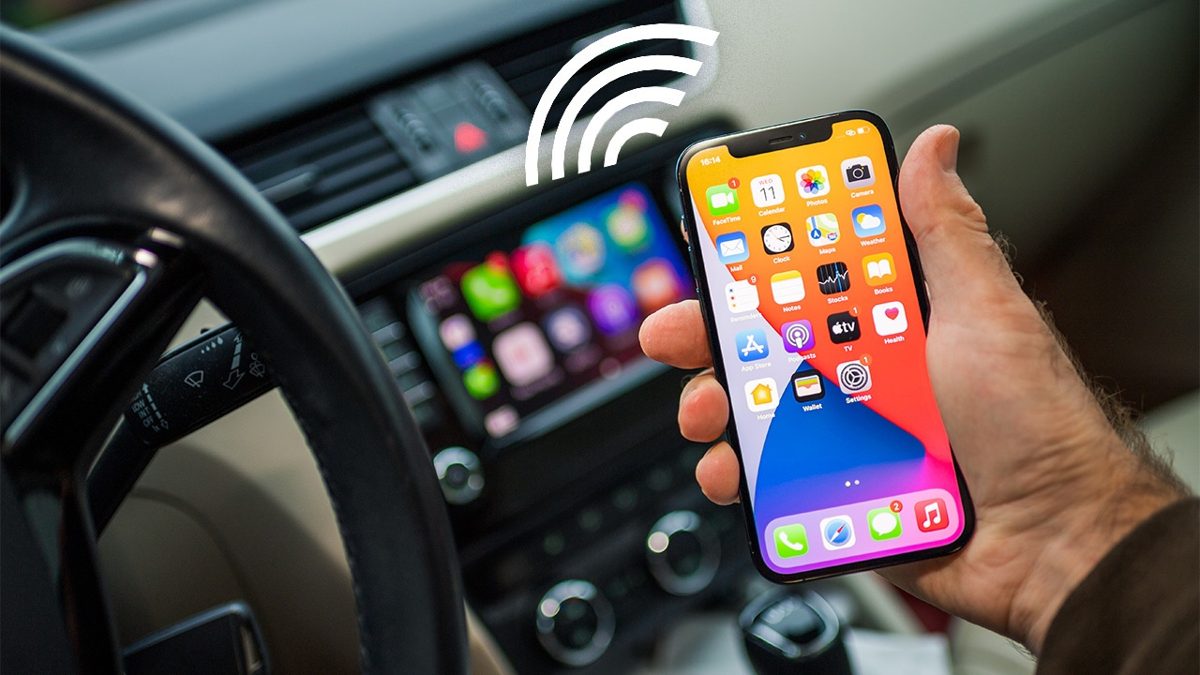
Most newer cars that support Android Auto or Apple CarPlay do so wirelessly. However, in many vehicles, using Android Auto or CarPlay requires plugging your phone in every time. Digging it out of a pocket or purse can be cumbersome, and it also means more wear and tear on the power port. That’s when a wireless dongle can save the day. They plug into your car’s smart USB-A or USB-C port, acting as a go-between to connect your phone to the dashboard via Bluetooth and Wi-Fi, so you can get in the car and start rolling—no need to plug in. To make it easier for you to choose the right one, I’ve tested several of these adapters to identify the best ones for this list. Read on to find the one that most closely matches your needs.
Ottocast states that the U2-Air is compatible with over 600 car models from 2016 onward, except for certain Sony aftermarket head units. Its boot time is rated at 18 seconds, and it defaults to 5GHz Wi-Fi. This model is only compatible with iPhones running iOS 10 or later. The stylish-looking (by dongle standards) U2-Air is easy to set up. It includes a 12-inch USB-A to USB-C cable plus a USB-C to USB-C cable. Once the iPhone connects via Bluetooth, the phone takes over the screen. It supports multiple iPhones. You can access the U2-Air’s settings via an IP address typed into the browser on your iPhone.
People who share a car: The adapter supports multiple iPhones, which is helpful if you’re not the only one using your car who wants to connect their phone.
The design-minded: Many wireless adapters resemble power banks, but the Ottocast U2-Air’s exterior is adorned with triangles, sure to pique the interest of your passengers.
This is a dongle from two big-name companies. The first is Motorola (specifically, the Motorola Sound division); the second is that Moto claims this is the first wireless adapter for Android Auto to feature technology designed by Google. The Motorola MA1 doesn’t have a terrible price, though you can pay much the same for units that support both Android and iOS/CarPlay. It resembles a Google Chromecast, with an integrated short USB-A cable. The phone connection is done over 5GHz Wi-Fi and Bluetooth. Phones have to support Android 11 or higher.
Android fans on a budget: The Motorola MA1 is regularly discounted by up to half, making it a cost-effective option for Android phone owners.
Couples who share a car: A button on the right-hand side of the adapter allows you to switch between two paired Android devices with a single press.
The Magic Link from The Magic Brand is rated to work with any iPhone from the 5 on up in “any vehicle with wired CarPlay.” It’s larger than some of the others, measuring 3.2 inches long, and features a decent-sized status LED on the front. It also features two ports—one at the top for USB-C and another at the bottom for USB-A—which allow you to connect the phone via a cable to use wired CarPlay, making The Magic Link a pass-through. It now also supports Android Auto. It includes a 12-inch USB-A to USB-C cable.
Multi-platform households: While most wireless adapters support either Android Auto or Apple CarPlay, the Magic Link supports both.
People who like to confirm settings by sight: The built-in status LED makes it easy to check the status of the adapter and which devices are connected at a glance.
While The Magic Box runs on Android, it still supports CarPlay for iPhone users, as well as Android Auto. It works in (most) cars and even on your home TV via an HDMI out port. The big difference is that it goes beyond the CarPlay and Android Auto app offerings—which are limited by design, for safety—to being able to display just about anything your phone can do. From games to Netflix, YouTube, and Hulu right on your dash (which is a terrible idea, but we can’t stop you). The 3.0 will do it in 4K on a TV. It has slots for microSD cards, USB-A and USB-C cables, and a micro HDMI slot for connecting to a TV. From the home screen on your car dash, you can access various Android apps (like Google Assistant) or jump right into CarPlay or Android Auto with your phone.
Apple CarPlay users: Although the Magic Box 3.0 supports wireless Android Auto and utilizes the Google Play Store for app downloads, it’s only compatible with vehicles that have wired Apple CarPlay.
EV owners: If you spend a lot of time at public chargers, the Magic Box 3.0 enables you to download your favorite streaming app and turn your car’s infotainment display into a TV.
Frequent travelers: In addition to letting you use almost any Android app in your car, the Magic Box 3.0 can be connected to a regular TV via HDMI, making it an excellent portable streaming box for those who spend a lot of time in Airbnbs or hotels.
The $169 Carluex Air has a unique look, like a little Hot Wheels racer. It supports both Android and iOS, plus offers a few extras—namely, wireless streaming from YouTube, Netflix, and Hulu from your devices. The ads say Carluex Air is lag-free, and it does feel a little faster than most.
Streaming fans on a budget: The Carluex Air is a more affordable alternative to the Magic Box 3.0 above and also supports not only streaming services but also most apps on the Google Play Store.
The Carlinkit 5.0 is compatible with any iPhone version 6 or higher, as well as phones running Android 10 and above. It does a great job connecting more than one phone, and comes with a couple of USB cables that allow for pass-through charging. Most important, this is one of the most affordable dongles, especially one that supports both iOS and Android.
Cost-conscious cross-platform households: This is one of the most affordable adapters that works with both Android and iOS devices.
Those who want pass-through: A USB-A port on the bottom of the Carlinkit allows you to connect a device for charging, so you don’t lose the port the adapter occupies.
My Experience
I’ve been writing about computers, the internet, and technology professionally since 1992, more than half of that time with PCMag. I arrived at the end of the print era of PC Magazine as a senior writer. I served for a time as managing editor of business coverage before settling back into the features team for the last decade and a half. I write features on all tech topics, plus I handle several special projects, including the Readers’ Choice and Business Choice surveys and yearly coverage of the Best ISPs and Best Gaming ISPs, Best Products of the Year, and Best Brands (plus the Best Brands for Tech Support, Longevity, and Reliability).
I started in tech publishing right out of college, writing and editing stories about hardware and development tools. I migrated to software and hardware coverage for families, and I spent several years exclusively writing about the then-burgeoning technology called Wi-Fi. I was on the founding staff of several magazines, including Windows Sources, FamilyPC, and Access Internet Magazine. All of which are now defunct, and it’s not my fault. I have freelanced for publications as diverse as Sony Style, Playboy.com, and Flux. I got my degree at Ithaca College in, of all things, television/radio. But I minored in writing so I’d have a future.
In my long-lost free time, I wrote some novels, a couple of which are not just on my hard drive: BETA TEST (“an unusually lighthearted apocalyptic tale,” according to Publishers’ Weekly) and a YA book called KALI: THE GHOSTING OF SEPULCHER BAY. Go get them on Kindle.
I work from my home in Ithaca, NY, and did it long before pandemics made it cool.
The Technology I Use
My first computer was a Laser 128, an Apple II-compatible clone with an integrated keyboard, matched with an eye-straining monochrome green monitor. I used it to type papers in college for other people for money…until I discovered the Mac SE in the college computer room. That changed my life. My first cellphone was a Samsung Uproar—the silver one with the built-in MP3 player from the Napster days (the pre-iPod era).
I use an iPhone 15 Pro hourly and an iPad Air infrequently (but I’m always in the market for a cheap Android tablet). I have a PlayStation 5 just to play Spider-Man, and several Windows machines, including a work-issued Lenovo ThinkPad. I talk to Alexa and Siri all day long. I do the majority of my computing on a 15-inch LG Gram laptop attached to a Thunderbolt hub to run a multi-monitor setup—I overdid it on the power needed to simply work from home.
I’m most at home in Microsoft Word after decades of writing there. More and more, I turn to services like Google Docs, using tools like Grammarly. I use Google’s Chrome browser due to an addiction to several extensions I think I can’t live without, but probably could. I use Excel extensively on data-intensive stories, but for chart creation, we’ve switched over entirely to using Infogram for interactive features that are hard to find elsewhere. I do a lot of graphics work for my stories, but limit myself to the free and amazing Paint.NET software to edit images.
I’m a firm evangelist for using the cloud for backup and syncing of files; I’m primarily using Dropbox, which has never failed me, but I also have redundant setups on Microsoft OneDrive, plus extra picture backups on Amazon Photos and iCloud. Why take chances? For entertainment, mine is a streaming-only household—my kid has never seen network TV and barely been exposed to commercials, thanks to Roku and Amazon Music. The house is peppered with smart speakers from Amazon for instant gratification and control of smart home devices like multiple Wyze cameras and Nest Protect smoke detectors. I’ve got accounts on all the major social networks, to my horror. I have a robot vacuum for each floor of the house. I want a 3D printer, but not sure what I’d use it for.
I’ve been writing about computers, the internet, and technology professionally since 1992, more than half of that time with PCMag. I arrived at the end of the print era of PC Magazine as a senior writer. I served for a time as managing editor of business coverage before settling back into the features team for the last decade and a half. I write features on all tech topics, plus I handle several special projects, including the Readers’ Choice and Business Choice surveys and yearly coverage of the Best ISPs and Best Gaming ISPs, Best Products of the Year, and Best Brands (plus the Best Brands for Tech Support, Longevity, and Reliability).
I started in tech publishing right out of college, writing and editing stories about hardware and development tools. I migrated to software and hardware coverage for families, and I spent several years exclusively writing about the then-burgeoning technology called Wi-Fi. I was on the founding staff of several magazines, including Windows Sources, FamilyPC, and Access Internet Magazine. All of which are now defunct, and it’s not my fault. I have freelanced for publications as diverse as Sony Style, Playboy.com, and Flux. I got my degree at Ithaca College in, of all things, television/radio. But I minored in writing so I’d have a future.
In my long-lost free time, I wrote some novels, a couple of which are not just on my hard drive: BETA TEST (“an unusually lighthearted apocalyptic tale,” according to Publishers’ Weekly) and a YA book called KALI: THE GHOSTING OF SEPULCHER BAY. Go get them on Kindle.
I work from my home in Ithaca, NY, and did it long before pandemics made it cool.
My first computer was a Laser 128, an Apple II-compatible clone with an integrated keyboard, matched with an eye-straining monochrome green monitor. I used it to type papers in college for other people for money…until I discovered the Mac SE in the college computer room. That changed my life. My first cellphone was a Samsung Uproar—the silver one with the built-in MP3 player from the Napster days (the pre-iPod era).
I use an iPhone 15 Pro hourly and an iPad Air infrequently (but I’m always in the market for a cheap Android tablet). I have a PlayStation 5 just to play Spider-Man, and several Windows machines, including a work-issued Lenovo ThinkPad. I talk to Alexa and Siri all day long. I do the majority of my computing on a 15-inch LG Gram laptop attached to a Thunderbolt hub to run a multi-monitor setup—I overdid it on the power needed to simply work from home.
I’m most at home in Microsoft Word after decades of writing there. More and more, I turn to services like Google Docs, using tools like Grammarly. I use Google’s Chrome browser due to an addiction to several extensions I think I can’t live without, but probably could. I use Excel extensively on data-intensive stories, but for chart creation, we’ve switched over entirely to using Infogram for interactive features that are hard to find elsewhere. I do a lot of graphics work for my stories, but limit myself to the free and amazing Paint.NET software to edit images.
I’m a firm evangelist for using the cloud for backup and syncing of files; I’m primarily using Dropbox, which has never failed me, but I also have redundant setups on Microsoft OneDrive, plus extra picture backups on Amazon Photos and iCloud. Why take chances? For entertainment, mine is a streaming-only household—my kid has never seen network TV and barely been exposed to commercials, thanks to Roku and Amazon Music. The house is peppered with smart speakers from Amazon for instant gratification and control of smart home devices like multiple Wyze cameras and Nest Protect smoke detectors. I’ve got accounts on all the major social networks, to my horror. I have a robot vacuum for each floor of the house. I want a 3D printer, but not sure what I’d use it for.
Read full bio
is obsessed with culture and tech, offering smart, spirited coverage of the products and innovations that shape our connected lives and the digital trends that keep us talking.
Note: All product names, images, brands, and logos mentioned above are the property of their respective owners. Thikra Blog provides summarized and curated tech information for UAE readers.
For more verified mobile phone guides, reviews, and UAE price updates, explore our articles at blog.thikra.co. To shop authentic devices and accessories, visit Thikra Store.





Leave a Comment