
Thikra Blog shares smart living tips, home gadget updates, and lifestyle technology insights tailored for UAE readers.
If you’re always buying brand-new tech products at full price immediately following their release, you’re missing out on massive savings. Devices from phones to earbuds often see discounts within a few months of their launch in new condition. The real way to find tech deals is on the used market.
You’ll get the most savings from people who are offloading products that are no longer needed for basically nothing, not those who know what they have. That’s why deal hunters should steer clear of secondhand tech communities or big resale sites like eBay. You won’t find a steal there. Instead, look to your local thrift stores or the roughly 4,000 Goodwill stores in the U.S. and Canada. With the right approach, you can snag modern tech on a budget.
Look for the tech in rough shape
But avoid anything with missing pieces

Knowing what to take a chance on and what to pass up on is a thrifter’s most valuable skill when searching for secondhand tech deals. You’re going to come across products in all sorts of shape, likely more bad than good. When digging through a tech pile at a thrift store, look for the filthy mounds of devices and accessories first. Most people don’t take the time to do it, and you can find some serious diamonds in the rough.
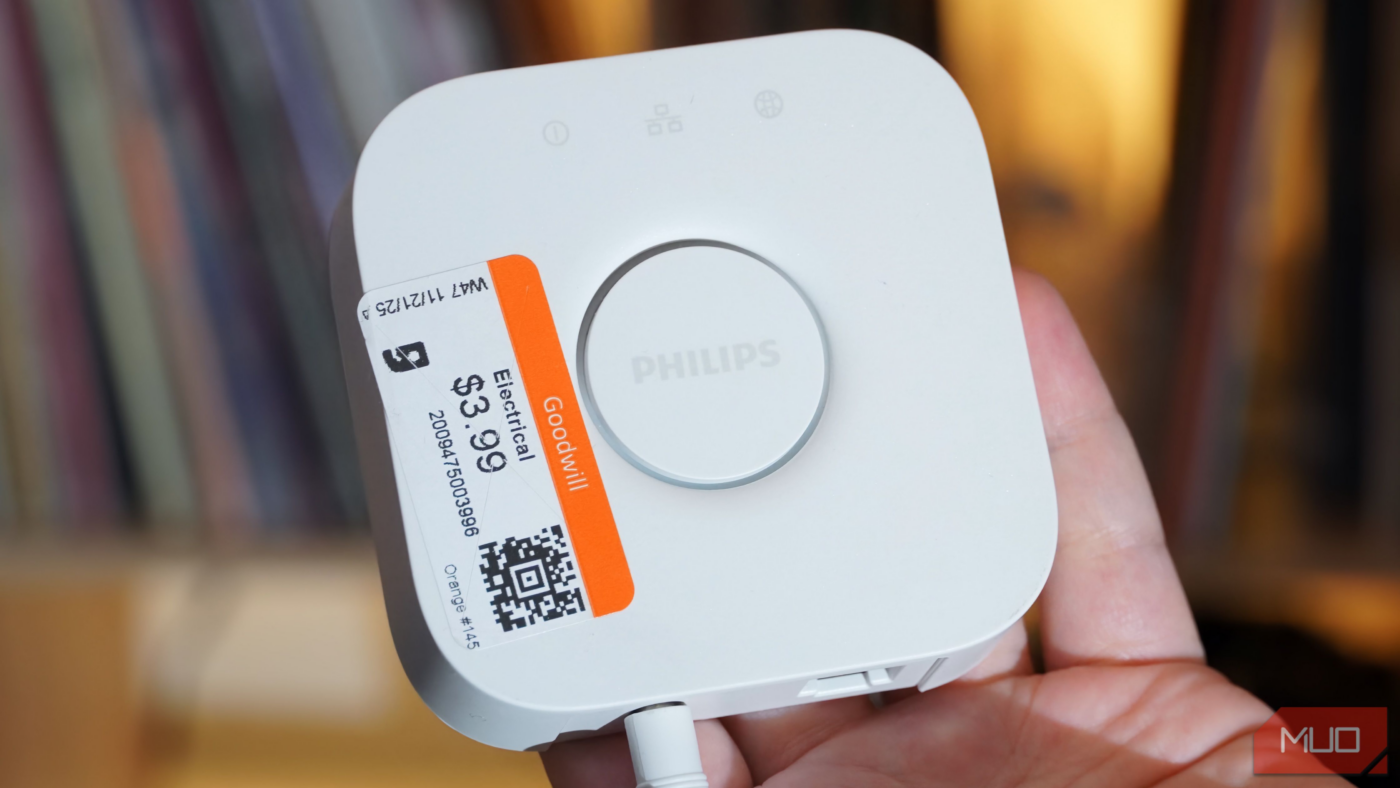
Don’t believe me? I snagged a Philips Hue Bridge, which typically retails for $60, for only $4 using this method. Some of my other wins include Apple AirPort Express base stations (around $40 on eBay) and TEAC CD players (around $100 on eBay).

Don’t be afraid to grab products with scratches, marks, or stains if the body of the device is intact. That’s especially true if the device is made of plastic, like many of the ones I’ve purchased. A bit of isopropyl alcohol and elbow grease can fix most imperfections. For extreme projects, you can use WD-40 and sandpaper to physically remove the stained or scratched surface layer of plastic, creating a pristine look.
You should avoid products that need major repair or are missing parts, though. If a tech product is missing its proprietary power cable or remote, for example, you’re better off leaving it at the store. You’ll spend more time and money tracking down a replacement than the product is worth — it’s something I’ve learned from experience.
Model numbers are your friend
They’ll tell you everything you need to know

Your best thrift store tech wins will come from lesser-known products that resellers and other enthusiasts passed up on. If it’s a niche or old product, it might be unknown to you, too. That means you need to trust your gut. If you see something that looks premium or intriguing, search the exterior for a model or serial number and run a Google search.
With a quick search, you can learn everything about a product. You’ll even find the product manual in many cases, which helps troubleshoot and determine if something is worth the risk. Using the model number, you can also check sites like eBay or Swappa to see if a product is in demand. There’s nothing worse than paying $20 for a thrift store pickup you could’ve had for $5 online.
When in doubt, look at the ports. If the model number you search for is linked to multiple product generations, the ports on a piece of tech is usually a dead giveaway. You can tell vaguely what era something is from by whether it has USB-C, USB-A, HDMI, VGA, or DVI, and so on.
Gemini Live is your secret weapon
It can identify products and tell if you’re getting a deal
You can take the model number trick a step further in 2025 thanks to multimodal AI, and specifically, Gemini Live. Hold down your Android phone’s power button, tap the Live button, and press the camera icon to start sharing your live camera feed. You can ask Gemini about the product you’ve found at a thrift store, including its name, specs, release date, and pricing.
Gemini Live’s conversations are continuous, so you can have a back-and-forth chat as you figure out whether a product is worth paying for. I tried it while deciding to buy a used Philips Hue Bridge. Gemini told me its name and features just by recognizing the exterior from my phone’s camera feed. I asked if it was worth the $3.99 price, and Gemini called it an “excellent price” because “they typically retail for much more if bought new.”

Using Gemini Live to find tech deals in the wild is like having a tech historian in your back pocket. I’ve been a tech enthusiast for 15 years, but there are limits to the kinds of products I can recognize when they’re worn out on a thrift store shelf. But I have a pretty good sense of whether a keyboard, mouse, audio product, or accessory might be a good deal. Gemini helps me confirm I’m right in seconds — or saves me from wasting my money.
What kinds of tech should you thrift?

Of course, you have to keep your expectations realistic. You’re probably not going to find a new phone or tablet at a thrift store, but you might be able to snag a case or charger for those devices. I’ve had success with all kinds of tech products, although my biggest wins have been in the audio and smart home space. That’s because it takes someone who knows their stuff to sort the gems from the junk — or someone with Gemini Live in their pocket.
Remember that the kinds of tech products you’ll find at thrift stores will vary greatly based on your location. If you’re in a big city with a high population of high-income earners, there’s a good chance people will be offloading quality tech to secondhand stores. Those in smaller towns might struggle to find deals as often because there are simply fewer used products to go around.
I tend to stick to Goodwill stores for a few reasons — they don’t overprice their tech, most locations have a seven-day return policy (great for testing questionable finds at home), and they’re consistent nationwide. That said, these tips will help you at any used store, and even might come in handy online.
source
Note: All product names, brands, and references in this post belong to their respective owners.
For more smart home guides, lifestyle tech updates, and UAE-focused recommendations, visit blog.thikra.co.
To shop smart gadgets, accessories, and lifestyle electronics, explore Thikra Store at thikra.co.









Leave a Comment