
Thikra Blog shares smart living tips, home gadget updates, and lifestyle technology insights tailored for UAE readers.
Over the years, I found myself using different calendars. I don’t know if this is normal for most people, but this situation built up gradually over a period of time. I did not intentionally get myself into it, but I feel it was quite avoidable. My calendars all worked fine individually, but together, there was a lot of friction. In the end, I was spending more time managing availability than actually protecting my time.
It was evident that I needed to regain control over availability scheduling without adding a new layer of friction. This need led me to Cal.com (Cal), the open-source meeting and appointment scheduling platform. Even though I was initially skeptical, it’s become a true revelation.
It sits in front of your existing calendars instead of competing with them

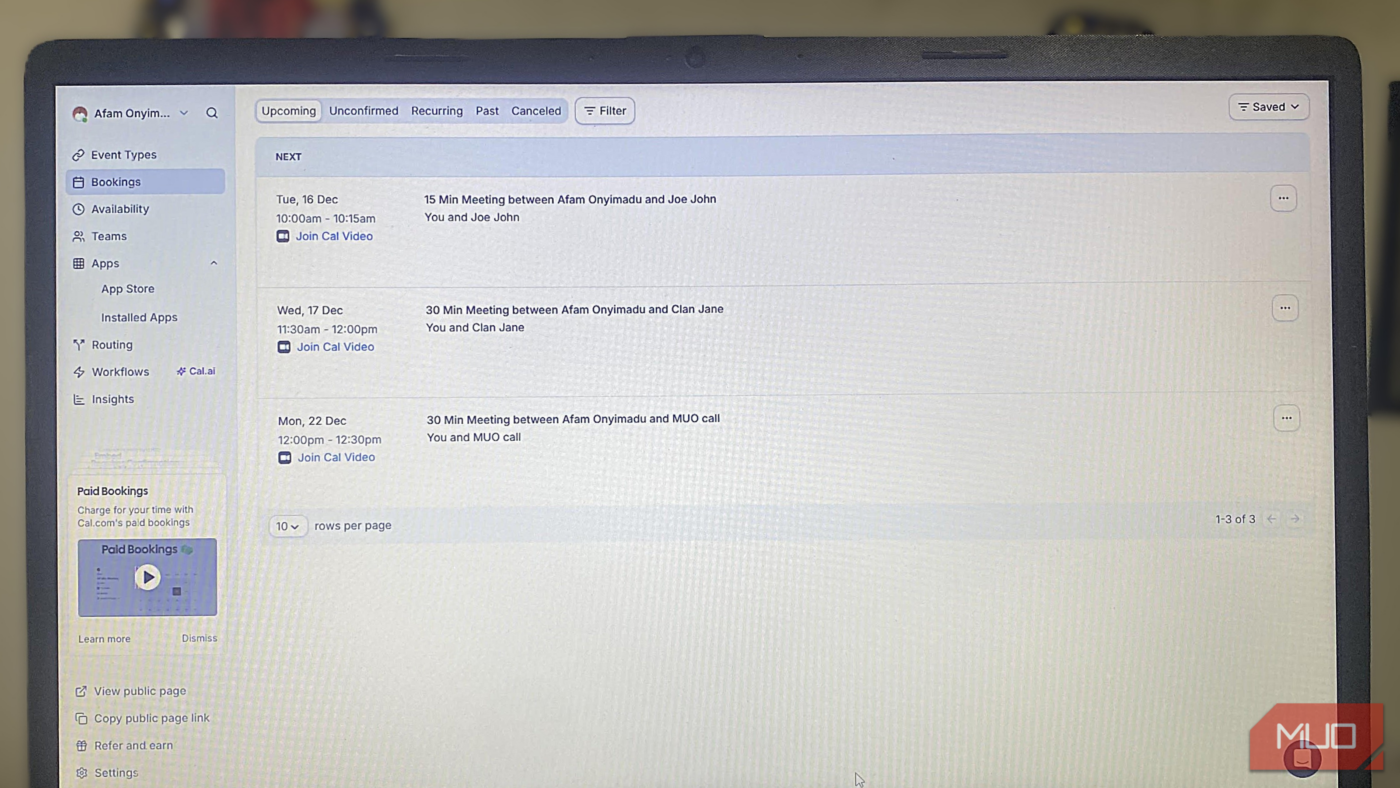
Certain scheduling tools I have tried failed because their main goal is to replace my calendar. Cal complements my calendar. Its ‘well-implemented calendar integration model makes it a controlled entry point to Google Calendar, Outlook, and many other calendar tools, and it isn’t nudging me to abandon them.
Practically speaking, Cal handles time negotiation, while the other traditional tools handle recording, and the key is its calendar-blocking logic. When I book a meeting through Cal, it simply shows up on the calendar I need it to be on, and there are no parallel systems to reconcile.
Cal handles only booking creation, allowing a distinct separation of duties, whereas other tools either forced me to trust aggressive syncing rules or required me to manage events in two different locations.
Availability rules did more to reduce stress than syncing ever did
Boundaries became enforceable instead of aspirational

Before I started using Cal, blocking time required manual effort, and I had to make adjustments on the fly. In fact, the only way I avoided overbooking was by purely relying on discipline; it works, but it’s not great for real productivity. Cal.com’s Availability and Event Type settings allow shifting from a single global availability block to defining multiple availability schedules and assigning them to each event type.
This allowed me to create strict hours for external meetings and more flexible options for internal calls. It enforces pre- and post-meeting buffers at the event type level, eliminating back-to-back meetings without manual effort.
It also allows you to set daily limits, which I find invaluable for controlling how many times a specific event can occur per day. Once I configured the limit, the system automatically blocks bookings when the threshold is reached.
However, what made all of this really appreciated is that I did not need to rely on syncing tricks to attain this level of granular control.
Flexibility is a strength
Cal shows a lot of flexibility through Event Types. But to get the best results and avoid friction, you need to apply some restraint. You can set duration, availability schedule, buffers, booking limits, questions, and integrations for each event type.
This allowed for a lot of customization that I overused early on. I was creating too many granular event types with slight differences. It only made maintenance harder than it needed to be. Once I understood this, I reduced my events to just a handful of core types, letting shared defaults handle the work. Instantly, it became more manageable and less messy, while still very powerful.
I found advanced features like custom booking questions and workflow automations invaluable. Cal.com’s Workflows allowed for more customization. I have built some workflow automations that send notifications and reminders. These features help me build processes around my events. I use these features only when I encounter friction. For instance, I may add conditional questions to events if I require extra context before meetings.
What I noticed was that Cal wasn’t forcing best practices, but was simply providing the building blocks and trusting me to use them to get the best out of the system.
Not because I audited the code; rather, because I didn’t have to guess

If you’ve followed my writing, you’ll know I’ve been leaving several services for open-source options. I recently replaced all my backup tools with an open-source alternative and also ditched Chrome for an open-source browser I can trust. Choosing an open-source scheduling service is a natural step in this process, and it’s especially helpful that Cal.com is self-hostable.
Open-source transparency mattered most around data handling and logic. Cal.com provides transparency into availability calculations, conflict resolution, and workflow triggers. This is totally different from some mainstream schedulers, especially when they silently override rules.
Transparency is reinforced with webhooks and API access that show exactly when events fire and what data is passed. It all makes for a more predictable system, especially when compared against tools that may change limits or behavior without notice.
Not the most polished scheduler, but it’s the most honest one
The main tradeoffs of using Cal are less polished onboarding and conservative default settings. But I stick to the free individual tier, and it’s practical and works as it should. More advanced features, such as advanced routing, are available in the paid Team tier. But what’s most consistent is honesty. Limitations are not hidden behind marketing language.
What I’ve appreciated most over time is that there’s been no pressure to upgrade simply to unlock basic but important functionality. You do not have to drop your calendar services, but Cal brings them all together very beautifully.
source
Note: All product names, brands, and references in this post belong to their respective owners.
For more smart home guides, lifestyle tech updates, and UAE-focused recommendations, visit blog.thikra.co.
To shop smart gadgets, accessories, and lifestyle electronics, explore Thikra Store at thikra.co.









Leave a Comment