
Thikra Blog shares smart living tips, home gadget updates, and lifestyle technology insights tailored for UAE readers.
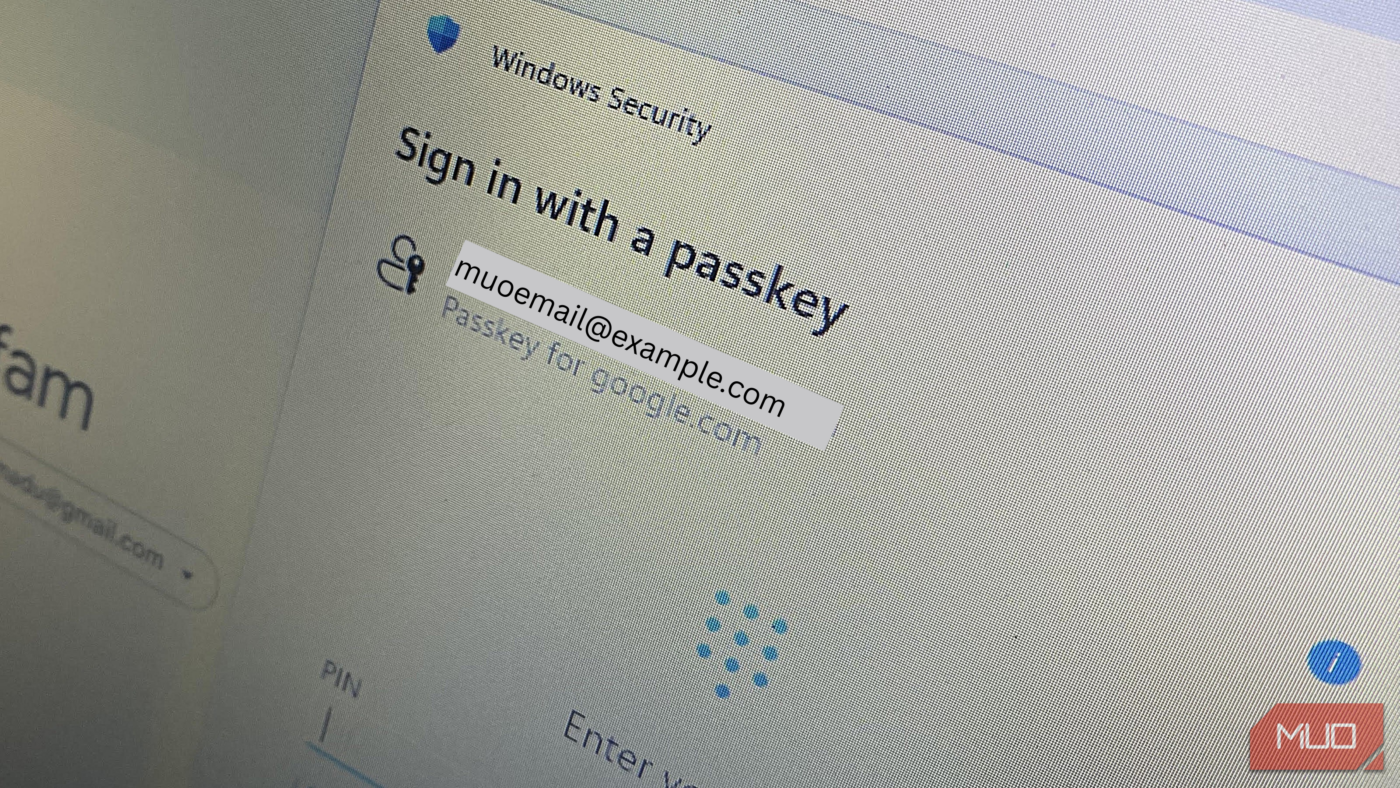
We went from passwords to passkeys, and they were touted as the future of authentication. However, they were initially very confusing. The jargon involved, like WebAuthn, FIDO2, and device-bound keys, made me hesitate for fear of being locked out of my accounts if my devices failed me. To add to that, native browser passkey management felt inconsistent across different operating systems.
I needed a solution that made passkeys feel more intuitive. After experimenting with a few password managers, including robust open-source options, I tried Bitwarden, and it almost instantly demystified passkeys. They became convenient, practical, and easy to manage.
The platform trap
Fragmentation was the real problem

The real issue I had with passkeys had nothing to do with cryptography. It was a problem with how they were implemented. Even though native Keychain works seamlessly on macOS and iOS, stepping outside the ecosystem brought friction. When logging in to Linux or Windows, I either needed my phone nearby or had to scan QR codes every time.
Passkeys didn’t feel like the universal standard they were marketed to be. They felt more like passwords had been replaced with a new layer that depended on specific hardware or platforms, and the promise of simplicity was defeated.
The real issues were visibility and control. Native passkey implementations are buried deep inside system settings. This makes them hard to audit, manage, or delete. I wasn’t clearly seeing what I had, where it was stored, or how it behaved across devices. It was the lack of transparency that made passkeys feel risky. Even if it seemed like the right time to use passkeys, I didn’t know how to start.
Bitwarden’s vault model changed everything
Passkeys became understandable once I could see them
I hit a turning point when I discovered that Bitwarden treats passkeys as vault items. Once I saved them, my passkeys lived alongside every other credential, a single implementation that successfully demystified the concept of passkeys.
For the first time, they were not hidden inside browsers or my OS settings, and passkeys instantly became visible and manageable. It was transparent enough for me to tell which accounts used passkeys. If needed, I could remove them. I had clarity on how authentication would work before logging in.
This newfound clarity inspired confidence in passkeys. Bitwarden wasn’t just storing the passkeys but giving me true ownership over them. This made passkeys a tool I used intentionally, rather than an abstract element working behind the scenes.
Solving the sync paradox without device lock-in
Passkeys that actually follow you

I somehow believed that passkeys were only tied to a single device. Bitwarden helped me unlearn this myth. Once it saves passkeys, they are encrypted in the vault and sync across desktops, mobile phones, and browser extensions that are authorized.
My fear of a single point of failure was eliminated when I understood how passkeys work. Even if I lost a phone or laptop, I wasn’t locked out, and my passkey is protected by encryption and unlocked only after local authentication.
Bitwarden also ensures that during syncing, only encrypted data is synced, and it can only be unlocked with a master password or biometric authentication. No raw cryptographic material is exposed. From a usability and security standpoint, it strikes a perfect balance that native systems struggle to achieve.
Living in the in-between era: passwords and passkeys together
Why is a hybrid manager non-negotiable

We are not yet a completely password-less world. While some services support passkeys, countless others rely on passwords. It would only create friction if any solution ignored this reality.
Bitwarden has a hybrid workflow that gives it real strength. It allows passwords and passkeys to exist in the same vault, protected by the same security model. Bitwarden can detect when a site supports passkeys, and it instantly offers to save one. For websites that do not use passkeys, the password manager generates and autofills strong passwords.
It gives you a gradual and stress-free way to adopt the new tech. Your workflows do not break, and there are no forced migrations. Over time, you can gradually use passkeys to replace passwords as support increases, and everything continues working without a hitch. The smooth transition that Bitwarden offers makes passkeys start looking less like an experiment.
Serious security without a paywall
Why Bitwarden’s free plan matters

Bitwarden allows full passkey management on the free plan, making it readily accessible to everyone. The free plan also supports unlimited passwords and unlimited devices. If you need to use passkeys, it provides a complete security workflow.
It’s open source, reinforcing trust. Its encryption model is publicly auditable, and the zero-knowledge design ensures that vault data, including your passkeys, cannot be read by Bitwarden itself. In practical terms, you get professional-grade, phishing-resistant authentication.

I’m Done With Google Password Manager: Here’s What I Use Instead
If you’re still using Google Password Manager, you’re missing out.
Passkeys finally feel usable, not theoretical
What really changed and made passkeys more understandable wasn’t the technology, but the surrounding experience. As soon as my passkeys were visible, portable, and easy to manage, it became more acceptable to me. This was a shift that occurred because Bitwarden understands how people use multiple devices and platforms.
If passkeys make logins feel more complicated, maybe try a password manager that’s built around a system that works for you.
source
Note: All product names, brands, and references in this post belong to their respective owners.
For more smart home guides, lifestyle tech updates, and UAE-focused recommendations, visit blog.thikra.co.
To shop smart gadgets, accessories, and lifestyle electronics, explore Thikra Store at thikra.co.






Leave a Comment