
Thikra Blog shares smart living tips, home gadget updates, and lifestyle technology insights tailored for UAE readers.
Photography has undergone immense changes over the last few decades, and as a result, you probably have a family photo collection in a variety of formats. More recent photos and videos are stored digitally on your devices or in the cloud, while older ones could be stashed away as printed photos, scrapbooks, or even film negatives and slides. If all or part of a photo collection is made up of film negatives, it can be hard to take a casual trip down memory lane or share images with others.
Luckily, there’s a way to use your smartphone to scan film negatives, turning them into digital images that can be freely edited, shared, or backed up in the cloud. Whether you’re still shooting on film (the nostalgia factor is bringing 35mm film cameras back) or are working with old family archives, various free apps can help convert negatives into digital photos. They all work basically the same way, but the one I used was FilmBox because of its popularity and support for both iOS and Android. As someone taking on the task of preserving my family’s photo collection and getting into the world of half-frame film photography in 2025, I was surprised to find FilmBox surpassed my expectations.
FilmBox scans and crops your negatives
All you need is a smartphone and a light source
FilmBox helps digitize your film negatives by handling multiple essential tasks at once, including scanning, cropping, and enhancing. The app uses the perforations on a filmstrip to identify each frame, intelligently cropping out the image without crooked framing or unnecessary parts of the frame line or edge code. The app’s algorithm also inverts the film frame’s colors and enhances the images where possible so they are viewable on a smartphone — and can be shared or printed afterward.
To view film negatives, you need a light source shining through the film frames to make them visible. Black-and-white filmstrips are easier to see with a backlight alone, but color strips typically invert the color values, making them look odd without reversing the inversion. Additionally, filmstrips have an orange tint that aids the color correction process. In order to make your film negatives look like a digital photo, you need an app like FilmBox to invert the colors and remove the orange “mask.”
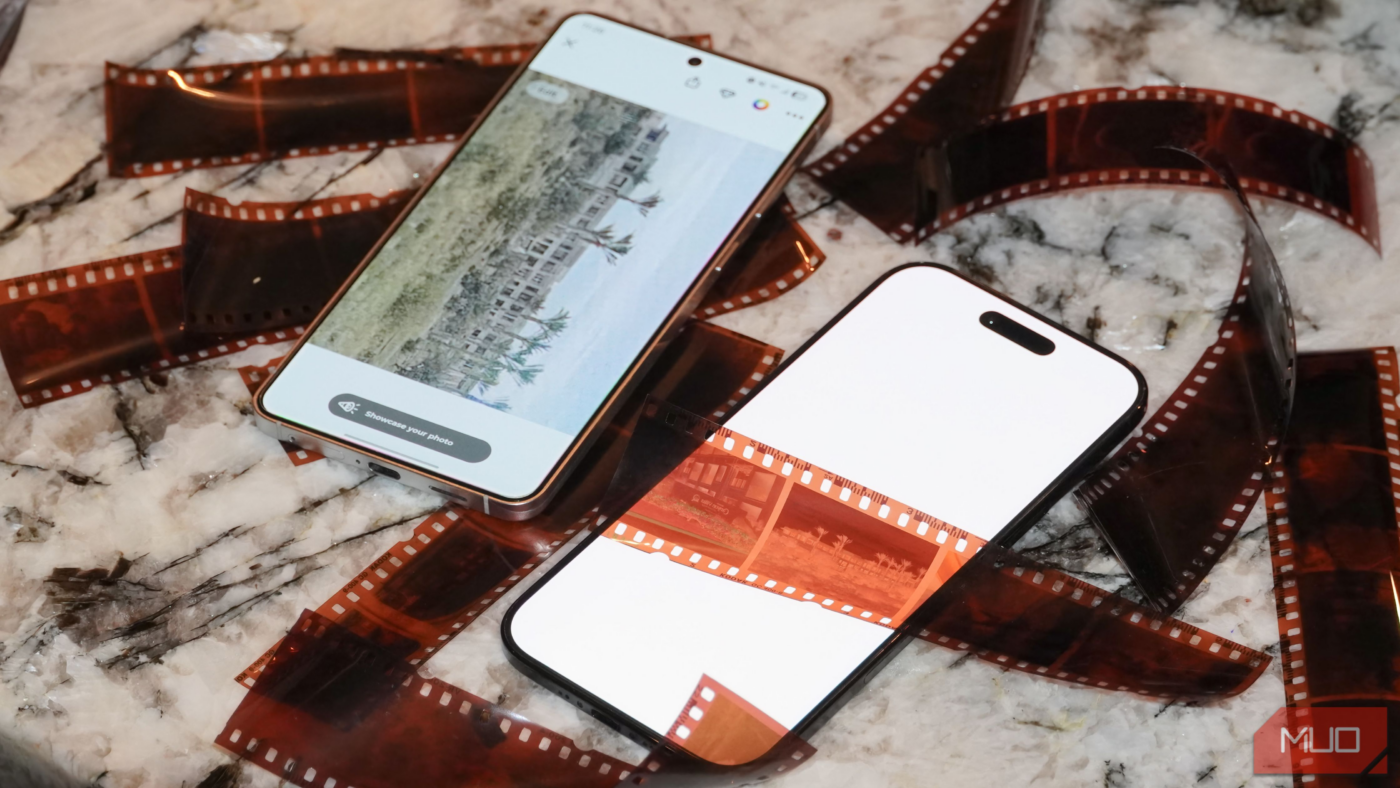
Like viewing negatives normally, you need to add a backlight behind your filmstrip before scanning it with FilmBox. This can be almost any digital device, like a white laptop, tablet, or phone screen. In this case, I used an extra smartphone. You need to hold the negatives roughly two inches away from the screen while scanning. Then, you can use the FilmBox app to scan the frames while long-pressing the capture button, keeping the camera lens as close to the filmstrip as possible for the best results.
This can be a one-person job, but it may help to have an extra set of hands when dealing with battered or curled-up filmstrips. After scanning the negative and letting the algorithm work, you’ll end up with something like this:

Before you pass judgment, I’ll note that this particular film capture is over 20 years old, and probably wasn’t taken with a great camera either. Depending on the camera and film used, plus the quality of the shot, you may get wildly different results. Some scans turned out full of color with a surprising level of clarity. Others, like the one you see above, are a bit grainy and dull. However, I’d say that image is about the worst you’ll get while scamming with FilmBox — most of my scans were better — and it still turned out discernible with excellent auto-cropping.
The app can colorize and enhance, too
Turn black-and-white film negatives into colored digital files
After running film negative scans through FilmBox’s standard color-correction and enhancement algorithm, you can optionally further sharpen or colorize photos. For black-and-white images, the app includes a colorization tool that automatically adds color to your photos. It works well, and even adds vibrancy and more prominent colors to frames shot with color filmstrips that end up washed out.
Another in-app enhancement tool is “Sharpy,” which tries to sharpen faces found in your digital scans. This feature likely won’t work on many of your film negatives, as it requires “photos with fully visible and clear faces.” However, when it does work, Sharpy is impressive — even if the sharpened faces look a bit eerie in photos otherwise covered in haze.

It’s easy to quickly scan film negatives as you can capture many frames at once, saving the processing for when you’re finished with a filmstrip or collection. You can go back and use the colorization or Sharpy tools at any time, so there’s no pressure to do it immediately. The scans can be saved to your device, uploaded to Google Photos, or shared with your computer — though these tools are frustratingly hidden behind a paywall.
An essential for any archivist or photographer
Digitizing old photos? Shooting new ones with film? This app is for you

Many of FilmBox’s features are available for free with an ad-supported tier, though. There are rate limits, and you’ll have to live with watching a few ads, but it’s certainly possible to use FilmBox for free without ever paying for a subscription. If you do need the full subscription, there’s a three-day free trial. I’d recommend picking a weekend for digitizing, taking FilmBox up on its free trial offer, and completing all your scans and exports in one go — remembering to cancel the free trial before you’re ever charged.
It’s frustrating to have a media collection split between mediums, and FilmBox helps you take one step closer to having a fully-digitized database of your photos and videos. Once they’re digital photos, your old film negatives can be backed up with cloud storage solutions or further enhanced with modern AI and ML tools. If you have film negatives lying around, using an app like FilmBox is a no-brainer.

- OS
-
iOS, Android
- Subscription Price
-
$7
.99
- Price model
-
Free with ads or subscription
FilmBox is a film scanner app for Android and iOS that scans, crops, and enhances film negatives. It also supports colorization and clarity enhancements for faces. The app has an ad-supported tier with optional in-app purchases available.
source
Note: All product names, brands, and references in this post belong to their respective owners.
For more smart home guides, lifestyle tech updates, and UAE-focused recommendations, visit blog.thikra.co.
To shop smart gadgets, accessories, and lifestyle electronics, explore Thikra Store at thikra.co.


Leave a Comment