
Thikra Blog shares smart living tips, home gadget updates, and lifestyle technology insights tailored for UAE readers.
Most home security setups have the same problem: everything works in isolation. Cameras record footage and sensors send alerts, but nothing actually talks to each other, and you’re left checking three different apps whenever something triggers. I spent a couple of years in that frustrating middle ground before I finally fixed my smart home connectivity issues and committed to building a system where devices actually work together.
Now my house responds to potential threats on its own — lights turn on, notifications hit my phone with camera thumbnails, and I know exactly who opened which door and when. The peace of mind that comes from a connected security setup beats passive monitoring every time.
A unified security ecosystem makes all the difference
Why I went all-in on Ring
Mixing security brands seemed like a good idea at first. Grab the cheapest motion sensor here, a random camera there, and whatever’s on sale. Except then, you’re juggling multiple apps, different notification systems, and devices that can’t trigger each other. I eventually standardized on Ring 6–7 years ago and haven’t looked back.
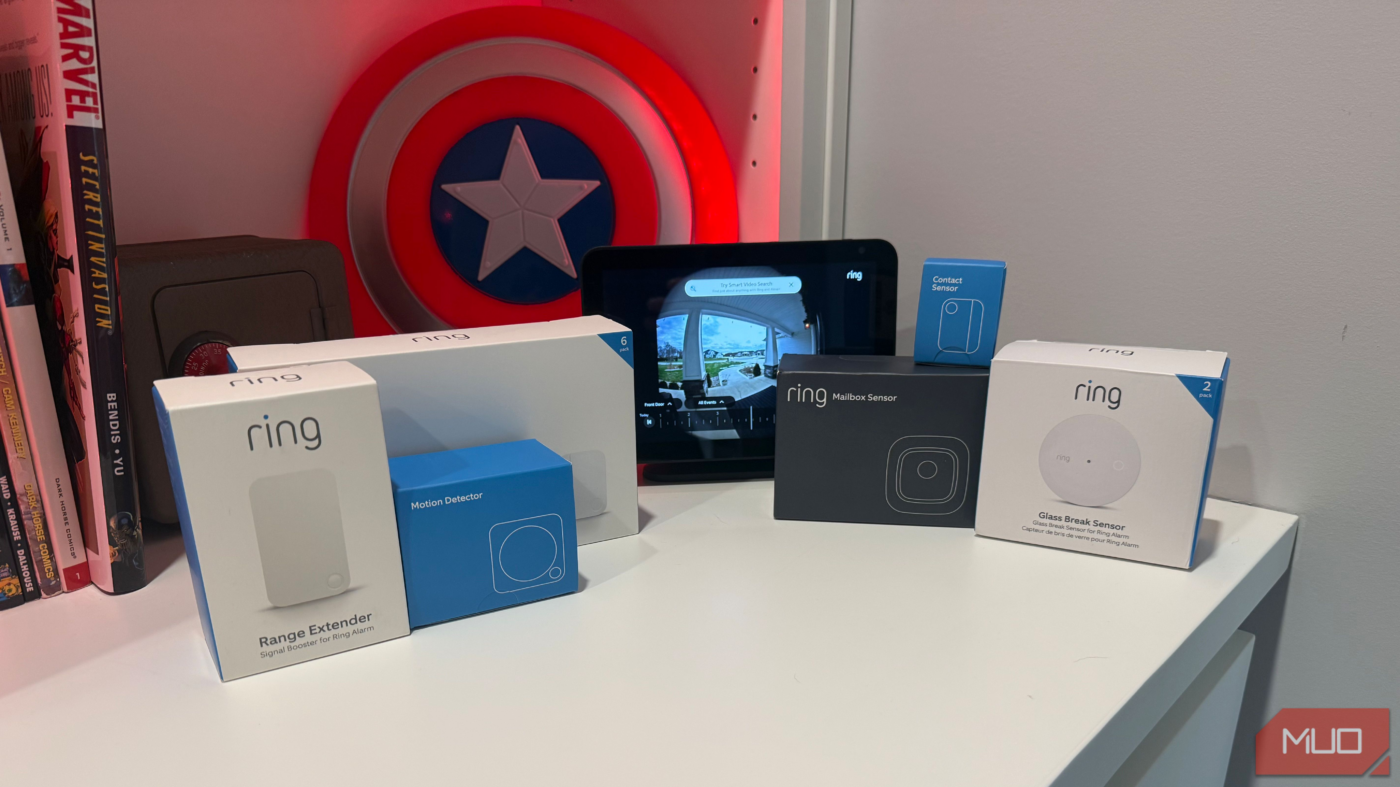
My current setup includes a Ring Doorbell Pro at my front door, contact sensors on every exterior door and window, water leak detectors under sinks and near the water heater, Ring Floodlight Cameras covering the driveway and backyard, plus a couple of Ring Indoor Cameras for checking on the dog. The Ring Alarm Base Station handles communication over Z-Wave, which means reliable mesh networking instead of the Wi-Fi dropout headaches I dealt with before.
Those contact sensors run about $11 each — genuinely one of the best smart devices under $20 I’ve bought. Everything lives in one app now. I have one activity log with one place to check when something triggers at 2 AM, sans my myQ gadgets.
The garage was my biggest security blind spot
How the myQ keypad solved access headaches
My garage doors worked fine with myQ openers, but “fine” meant I could open and close them remotely. There is no way of knowing who accessed the garage or when. And handing physical remotes to a dog walker or a neighbor meant hoping they’d remember to return them.
The myQ Smart Garage Video Keypad fixed all of that for under $50. The wide-angle 1080p camera sees pretty much everything — my whole driveway approach and the area right in front of the garage door. After installing my garage keypad upgrade, the custom PIN codes alone justified my purchase.
Now everyone has their own code. My wife, each kid, and the dog walker — all separate PINs. I gave some contractors a code that’s locked to weekday business hours. The HVAC company gets temporary codes — usually set to expire the same day, so I don’t have to remember to delete them later.
I also bought the myQ Wired Power Adapter Kit for another $30. This way, I never have to charge it.
Automations turned passive security into active protection
Motion-triggered cascading lights that look human

Recording footage is useful after something happens. But I wanted my house to actually respond to motion in real-time. The Ring Floodlight Camera in the driveway now triggers a whole sequence when it detects someone after dark.
Here’s how I set it up: the floodlight goes bright right away, then there’s a pause before the garage interior lights join in, followed by another pause before the front porch. I built similar patterns at the back patio and side entrance — each with lights moving inward from wherever the camera sits.
Flipping every light on simultaneously screams automation. The gaps between the lights make it look like someone inside noticed the motion and is checking things out throughout the house. I spaced everything about twenty seconds apart because that’s roughly my walking pace through the house.
This automation made my smart home feel actually smart. When there’s no motion for fifteen minutes, the lights go dark again. Coming home after sunset to a lit driveway and porch is one of my favorite parts of the whole setup.
Turning door sensors into automation triggers

Those Ring contact sensors I mentioned earlier pull double duty. Yes, they’re part of the alarm system. But they’re also cheap automation triggers, costing around $11 each.
I put one on the door to my home office, and now the lights turn on right when I’m ready to start work — instead of having to juggle my coffee, notepad, and laptop while reaching for the light switch.
I’ve automated my entire home with smart sensors and triggers over the past year or so, and these dirt-cheap sensors probably run more routines than anything else I own.
For the garage doors themselves, I added a ThirdReality Zigbee Smart Garage Door Tilt Sensor to each one. They run around $20 and use an accelerometer to know whether the door is up or down. I use them as a trigger to turn on all the garage lights when I pull in. Yes, I have myQ openers, but they don’t integrate well with Alexa.
The battery life on these sensors has been great. I put the Ring contact sensors in almost three years ago, and all still have their original batteries.
Visual notifications catch what phone alerts miss
Using smart bulbs as a secondary alert system

Phone notifications are easy to ignore. Half the time, I’m wearing headphones or the phone is charging in another room. A light flashing in my office, though? I caught that immediately.
The smart lights on the shelves in my office flash twice when someone rings the doorbell. Missed deliveries dropped dramatically after I set that up. I properly automated my smart bulbs with a bunch of visual notification routines — weather alerts, bedtime cues for the kids, that kind of thing.
On the security side, a Ring Indoor Cam in the living room flips on the lights whenever it catches motion after dark. Ring dropped the price to around $25 — it used to be double that. The person detection works well enough that I’m not getting pinged every time the dog walks by. The two-way audio feature proved useful as well. My dog, Bella, sometimes loses her mind over squirrels, and I can tell her to cut it out without leaving my desk.
A connected home handles security before you even think about it
My total investment here wasn’t as steep as I expected. Contact sensors at $11 each, tilt sensors around $20, and the garage keypad under $50. Even by adding floodlight cameras and the wired power kit, I’m still well under what a traditional monitored security system would’ve cost — and my setup actually does things instead of just recording.
Start with whatever security gap annoys you most. Could be the garage door you’re always second-guessing, or that dark porch you trip over trying to find your keys. Pick one thing, automate it, and make sure it works for a couple of weeks. Then add another. A truly smart security system doesn’t wait to be told there’s a problem. It’s already handling it.
source
Note: All product names, brands, and references in this post belong to their respective owners.
For more smart home guides, lifestyle tech updates, and UAE-focused recommendations, visit blog.thikra.co.
To shop smart gadgets, accessories, and lifestyle electronics, explore Thikra Store at thikra.co.







Leave a Comment