
Thikra Blog shares smart living tips, home gadget updates, and lifestyle technology insights tailored for UAE readers.
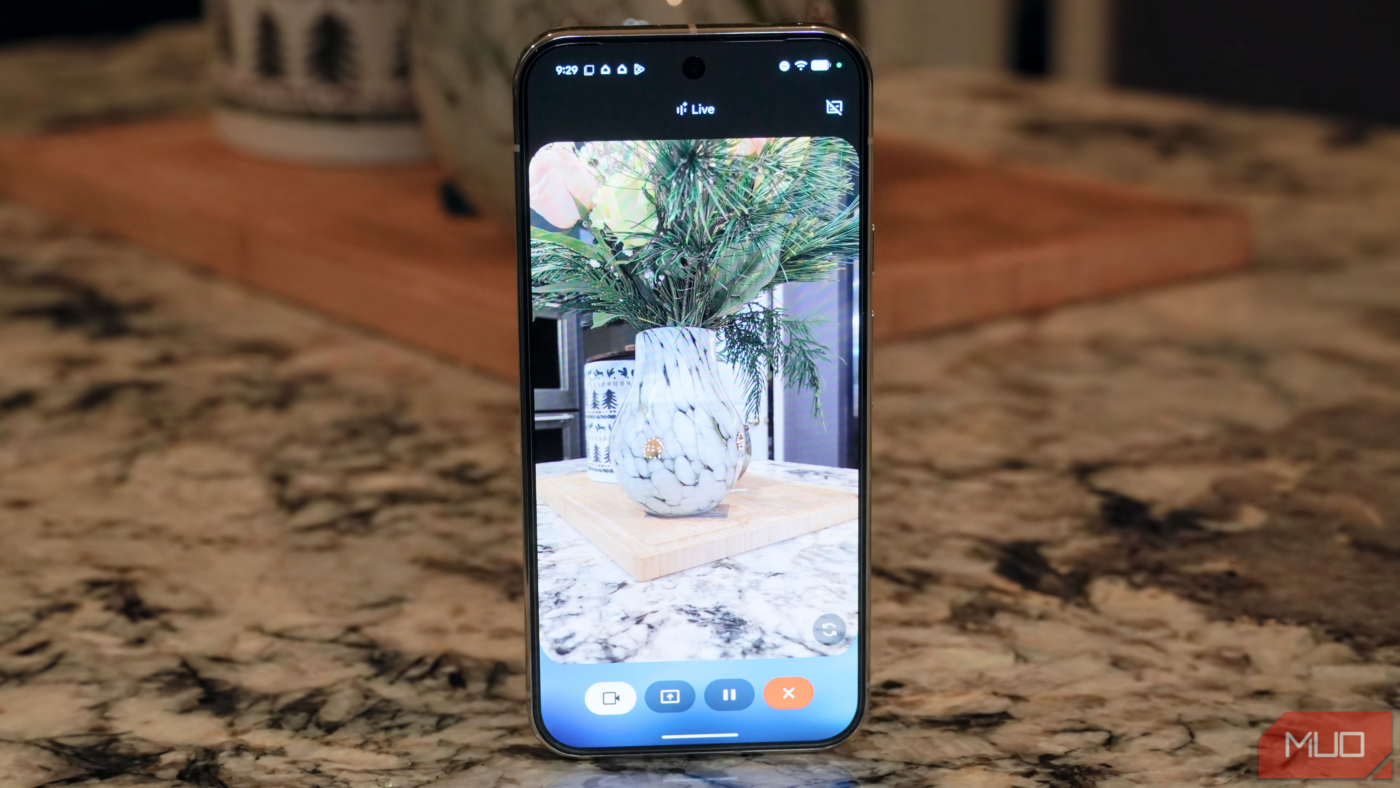
Gemini is replacing Google Assistant on most Android phones, and the upgraded voice assistant brings the power of AI into your conversations. However, the basic Gemini voice assistant is just one way to interact with Google’s best AI models. There’s also Gemini Live, which is more conversational, allowing users to go back-and-forth with Gemini as part of a continuous chat. Even beyond the standard Gemini Live experience, there’s a live-streaming mode that lets Gemini tap into your phone’s real-time camera feed.
If you’re wondering why you’d ever want to share your live camera feed with Gemini Live, there’s one simple reason — it can give the AI assistant additional context to better understand your request. When describing the problem you’re facing would be difficult, sharing your rear- or front-facing camera feed can provide Gemini with the visual information it needs to address your questions. It can be a quicker and simpler way to solve problems and brainstorm ideas than using Gemini, voice-based Gemini Live, or Google Search alone, especially with the right tips and tricks.
Personalized meal planning
Show Gemini your fridge or pantry and get instant dinner ideas
Gemini Live can make your life easier, but to get the most help, you need to think outside the box. One way I’ve used Gemini Live’s video streaming capabilities to solve everyday problems is by tabbing the dynamic assistant as my personal meal planner. I turn on the camera, show Gemini Live what’s in my pantry, and ask it for ideas about what to make for breakfast, lunch, or dinner. Like with any Gemini Live chat, the conversation is steady, and I can walk around my kitchen giving Gemini the data it needs to suggest tasty meal options.
When Gemini Live suggests a meal option, I can show it the contents of my fridge and spice drawer to ensure I have everything I need to complete the recipe. To round out the experience, I’ll ask Gemini Live to provide the exact recipe for the meal it suggested. Gemini Live can either stay running as you prepare the meal, or you can end the continuous chat and view the recipe in text form in the Gemini app. It’s an incredible way to uncover clever dinner ideas when you’re running out of options or are tired of having the same meals.
Identify tech and appliances for troubleshooting
Forgot the name of your dishwasher? Gemini Live can help

If there’s one thing I’ve learned as a tech enthusiast and reviewer, it’s that you can’t save the box and manual for everything. The worst-case scenario, though, is that you throw away the packaging and user guide for a tech product or household appliance and something goes wrong years down the line. Then, you’re left wondering what the device is called or how to solve your problem. This is especially tricky for appliances that may have a model number and other identifying information hidden away by cabinets or fixtures.
By flipping on your live video feed, Gemini Live can help identify the appliance’s name, surface manuals from the web, or guide you through basic troubleshooting steps. I’ve regularly used Gemini Live to identify tech products while thrifting, and it works just as well with devices or appliances you already own.
Instead of struggling to describe your problem in a search engine or hopelessly adding “Reddit” to the end of your query, use Gemini Live’s video streaming support. By using a combination of live video and spoken descriptions, Gemini Live can help you solve common household issues. These features give Google’s AI models more information specific to the problem you’re facing, improving your chances of success.
Get help assembling furniture and more
Practical tips based on what you’re seeing

I’m pretty handy with power tools and household projects, but some instructional guides for self-assembled furniture are just too complicated. Some steps don’t make sense at first glance, pieces are poorly labeled, and there’s always a screw that seems to disappear into thin air. Gemini Live’s video streaming support can help with all of these struggles — simply point your phone’s camera at the manual, ask your question aloud, and wait for the answer.
In the photo above, I’m using Gemini Live to figure out how to secure my Christmas tree in its wire stand. It’s the kind of thing you need to re-learn annually, long after you’ve tossed the box and user manual in the trash.
The back-and-forth nature of Gemini Live chats means that you can ask Gemini what it needs to see to solve your problem, adjusting your camera angle accordingly. It might want a wide shot of all the pieces required to assemble an Ikea chair or a close-up view of a screw pile to find the one you need. This can be more helpful than using a search engine, since Google Search can’t tell you whether it needs more information to help you.
Organize your worst junk drawer
AI can give you the help you need to conquer the mess

Most people probably have a junk drawer in their home that simply feels impossible to ever clear out — I know I do. Instead of stressing yourself out trying to find a clean home for every tiny object in your junk drawer, pass the mental load onto Gemini Live. Ask it for help organizing the mess. It’ll likely ask you to take everything out of the drawer, and it might suggest organizing things based on category or kind.
To finish up, you can show Gemini Live what organizational tools you have — think plastic bags or drawer trays. Or ask Gemini Live which organizational tools would be helpful before heading to the office supply store to buy a few.
Other ways to use Gemini Live to your advantage
Knowing which Gemini mode to use in a given situation is key to getting successful help. For basic requests that are easy to describe, the basic Gemini chatbot or standard Gemini Live voice mode may do the trick. More complex tasks that require visual context may benefit from using Gemini Live’s video-streaming mode for the best results. Gemini Live also supports screen sharing for when you need to have a free-flowing conversation with Gemini about what’s on your phone screen. Once you start using Gemini Live to solve household problems, you won’t be able to go back.
source
Note: All product names, brands, and references in this post belong to their respective owners.
For more smart home guides, lifestyle tech updates, and UAE-focused recommendations, visit blog.thikra.co.
To shop smart gadgets, accessories, and lifestyle electronics, explore Thikra Store at thikra.co.










Leave a Comment