
Thikra Blog shares smart living tips, home gadget updates, and lifestyle technology insights tailored for UAE readers.
You sit down at your desk, coffee in hand, ready to be productive. You open your browser to do some work, and — almost as a reflex — you open a new tab. “I’ll just check the headlines for five minutes,” you tell yourself.
Two hours later, you are deep in a Wikipedia rabbit hole about the history of the spork, you’ve scrolled through three years of an ex-colleague’s Instagram, realizing you really need to quit wasting hours on your phone, yet you have accomplished absolutely zero work. The web is engineered to be distracting; it is an economy built on capturing your attention and refusing to let go.
Willpower alone often isn’t enough to fight against algorithms designed by PhDs to keep you scrolling. I realized I couldn’t simply “try harder” to focus. I needed a tool that was stricter than I could ever be with myself. That is when I found StayFocusd.

- OS
-
Google Chrome
- Price model
-
Free
Boost your productivity with StayFocusd. Limit time on distracting websites so you can focus on what truly matters.
StayFocusd gives you control over your browsing time
Build a personalized wall against distractions
Unlike simple blockers that operate on an all-or-nothing basis, StayFocusd lets you set specific time allowances for different groups of websites. You can allocate exactly 10 minutes per day to Instagram, for instance, while giving yourself zero access to Twitter during work hours.
So let’s jump right in to setting up your first blocking group. The extension presents a clean dialog where you enter the websites you want to restrict, one per line. You can use wildcards too, so entering “*.com” would block all .com sites, or “*foo” would block any domain containing “foo.” This precision matters when you need certain parts of a website for legitimate work. The Allowed Sites feature works as a whitelist, allowing you to carve out exceptions even when broader restrictions are in place.
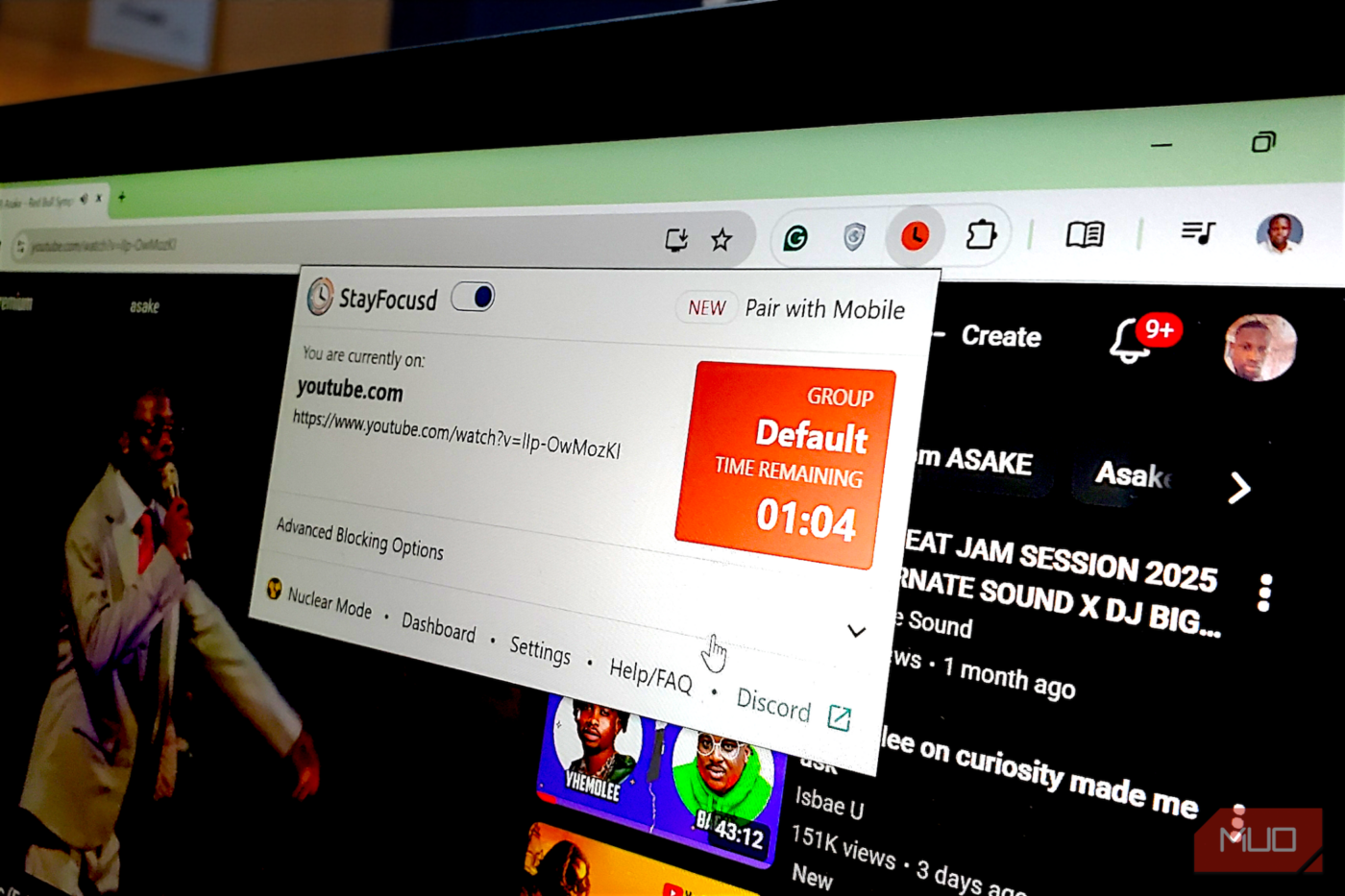
Once you’ve added your blocked sites (I started with YouTube, as shown in my setup), you configure how much time you’re allowed per day. The interface displays a timer showing your remaining time for each group, and when you’re on a blocked site, a persistent indicator shows exactly how much time you have left. This visual reminder creates psychological pressure, making you consider whether scrolling through another video is worth eating into your limited allowance.

The 12 Best Chrome Extensions for Avoiding Online Distractions
Web surfing brings massive online distractions. Chrome can help you avoid them with the help of a few useful extensions.
The “Active Days” and “Active Hours” settings add another layer of control. You can configure StayFocusd to enforce restrictions only Monday through Friday, or only during your core working hours — say, 9 AM to 6 PM. Outside those windows, the extension steps aside entirely. This prevents the tool from becoming oppressive during your leisure time, maintaining the crucial psychological distinction between chosen relaxation and compulsive distraction.

The extension also offers in-app blocking for platforms like YouTube, TikTok, and Instagram, letting you block specific features within sites rather than the entire domain. You might allow YouTube for educational content while choosing to disable YouTube Shorts and comments — the algorithmic quicksand that transforms a five-minute video into an hour-long session.
The Nuclear Option and other features make cheating nearly impossible
All these features I mentioned above are useful, but they share a vulnerability: you can disable them whenever temptation strikes. That’s where StayFocusd’s most powerful tool emerges — the Nuclear Option. It is the only way to really block time-wasting websites by removing the choice entirely.
When you activate Nuclear Mode, you’re making a binding commitment. The interface asks which sites you want to block (your blocked list, everything except your allowed list, or literally all websites), what you want to block (whole sites or just certain content types), how long you want the lockdown to last, and when it should start. You can trigger it immediately or schedule it for when your daily time limit expires.
The critical detail appears in bold text: “There is no way to cancel this once you activate it.” Trust me, this isn’t an exaggeration or scare tactic — it’s technically enforced to the letter. Once activated, the Nuclear Option cannot be disabled, even if you uninstall the extension, restart your browser, or restart your computer. The lockdown persists for its full duration with absolute reliability.
Now, if you want friction without total scorched-earth commitment, the Require Challenge feature offers a pragmatic middle ground. When enabled, any attempt to change StayFocusd settings is gated behind a task. Typically, you are presented with a lengthy passage of text, often reflecting on procrastination itself, which you must retype perfectly, character for character. The default text runs over 250 characters, turning what should be a two-second setting change into a tedious five-minute chore. Well, depending on how fast you type. And in my case, most times, by the time you’ve finished typing, the urge has passed, or you’ve recognized it as procrastination in disguise.

I put these 5 open-source extensions on every browser I touch
Browsing feels broken without these open-source tools.
StayFocusd changes how deep work feels
After using StayFocusd consistently, I’ve noticed that beyond mere productivity gains, the quality of my work sessions has fundamentally shifted. The constant low-level anxiety about resisting temptation — that background awareness that distraction is always one click away — evaporates when your restrictions are active.
The extension also creates clearer boundaries between work and leisure. When I close my laptop after a StayFocusd-enforced session, I feel a great deal of satisfaction rather than the vague guilt that comes from half-working while half-scrolling all day. And when I do check social media during unrestricted hours, it feels like an intentional choice rather than a compulsion.
source
Note: All product names, brands, and references in this post belong to their respective owners.
For more smart home guides, lifestyle tech updates, and UAE-focused recommendations, visit blog.thikra.co.
To shop smart gadgets, accessories, and lifestyle electronics, explore Thikra Store at thikra.co.









Leave a Comment