
Thikra Blog shares audio gear reviews, wearable tech updates, and device guides to help UAE users choose the best earbuds, headphones, and smartwatches.

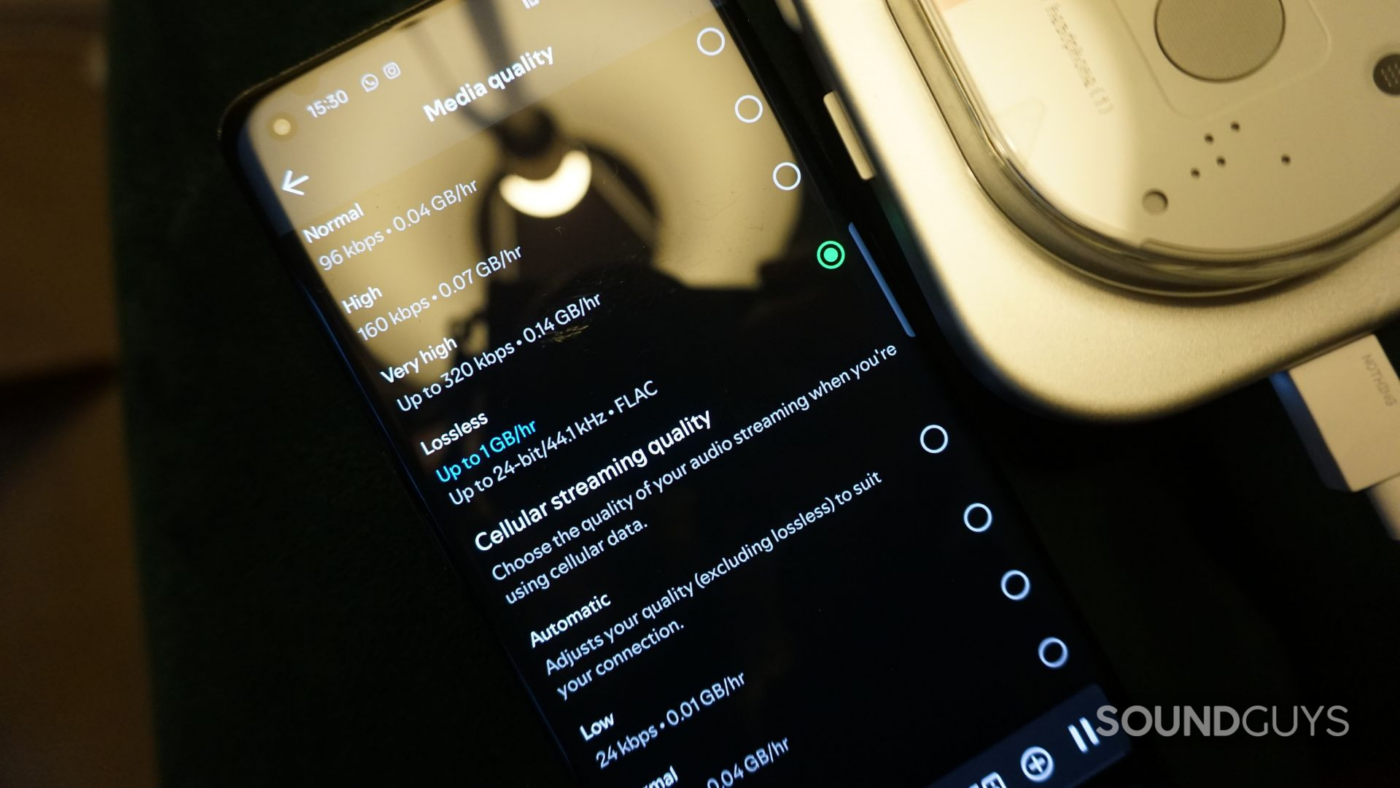
Spotify Lossless has been available for a couple of months and has been well-received by most. Providing 24-bit/44.1kHz FLAC audio streaming for nearly every song on the platform, the company has finally caught up with rivals like Apple Music, Amazon Music, Tidal, and Qobuz. But are listeners making the most of Spotify’s long-awaited Hi-Res feature, or are misconceptions with the “Lossless” moniker misleading users? Here’s the dos and don’ts, and how I get the most out of Spotify Lossless.
How do you use Spotify Lossless?
80 votes
Roll up, roll out

Spotify Lossless requires a Wi-Fi connection to work optimally.
Spotify launched its Lossless feature on September 10, 2025. At the time, its Newsroom press release stated that “Lossless is rolling out gradually to more than 50 markets through October.” However, the United States, along with some European, Asian, and Oceania countries, received access almost immediately after launch. While Reddit users have noted patchy, location-dependent access, the feature is now widely available globally. As of October 6th, 2025, Spotify stipulates that “Lossless is now available to Premium users in more than 50 markets.” That’s notable, as lossless streaming remains unavailable to roughly 432 million Free-tier members (more on that in a moment).
Spotify users were previously limited to 320kbps, Ogg Vorbis audio. This is a free, open-source audio compression and multimedia container format. While it is widely considered superior to MP3 at lower bitrates, the latter is more compatible with a wider range of devices and services. Unlike high-fidelity formats such as WAV, both are ideal for saving mobile data and device storage space. To that end, Spotify hasn’t rescinded its lower-quality offerings; you can still stream audio at 24, 96, 160, and 320kbps.
The Free Lossless Audio Codec (FLAC) compresses digital audio files without quality loss.
In fact, Spotify’s podcast quality is still limited to 96 and 128kbps on portable devices and the web player, respectively. Spotify Free subscribers can also only stream music at a maximum bitrate of 160kbps. To stream 320kbps or lossless audio, you’ll need to shell out $5.99, $11.99, $16.99, or $19.99/month for a Student, Individual, Duo, or Family Premium plan. Mercifully, you can still try a month of Spotify Premium for free to gauge whether paying for lossless is right for you.
The benefit of subscribing, of course, is that you can stream high-quality music that more closely resembles the original audio recording. Spotify’s support of the Free Lossless Audio Codec (FLAC) also spells good news for fans who enjoy downloading songs. Unlike uncompressed audio formats such as WAV and AIFF, FLAC compresses digital audio files without loss of quality. So, in reality, you can download more Hi-Res songs onto your device without eating up as much of your precious storage space.
Switch on, sit back, relax

Jhaycee Calvez / SoundGuys
Do you still take time to listen to music?
And yet, as nice as gaining access to millions of songs in Hi-Res format is, it’s only half the story. For starters, you won’t get much mileage out of FLAC files if you’re listening with cruddy headphones. Cheap cans often introduce unwanted distortion due to poorly constructed components, mediocre material quality, and low-impedance drivers. Some headphones also have rubbish stereo imaging. This makes it difficult to differentiate where individual instruments are located in a stereo field. Instead, you should consider premium headphones, such as the formidable Sennheiser HD 800 S.
Purchasing headphones that fit well is vital for achieving the best possible audio quality. For example, loose-fitting headphones can make bass frequencies sound underemphasized. Meanwhile, headphones that are too tight could unnaturally push the outer ear, affecting how sound is channeled inside the ear canal. This can drastically alter sound quality and stereo imaging. It’s also important to play around with custom EQs, as everyone’s ear anatomy and preferences are unique.
Ambient noise will mask any subtle sounds you were hoping to hear.
You’ll also want a device with a high-quality digital-to-analog converter (DAC) built in. While this doesn’t have to be standalone, as my colleague Dave Carr recommends, it’s best not to be frugal here. DACs are vital for converting a digital music source into a signal your headphones can actually play. If you want to hear all the nuances lossless audio has to offer, this conversion needs to be free of coloration and unwanted artefacts. Audio interfaces, such as the Focusrite Scarlett Solo (4th Gen), are excellent, versatile, and affordable options.
If you’ve ever listened to music on your noisy commute, you’ve likely already noticed that it sounds worse than listening at home. That’s because it becomes increasingly difficult to hear specific instruments and individual notes when audio bleed takes hold of your mix. Unfortunately, our ears aren’t perfect like microphones. Instead, auditory masking makes them ignore sounds that are close in frequency if one sound is louder than the other. So, if you want to hear those extra reverb tails or room reflections, you’re best listening in a quiet environment.
Listening wirelessly? Take note

Creative professionals will enjoy using this pair of open-back headphones for audio mixing.
No matter how many “Hi-Res” logos you see plastered on Bluetooth headphone boxes, none can play lossless audio wirelessly. That’s because, despite all the marketing jargon thrown at us, Bluetooth still compresses everything before it reaches our ears. So, while Spotify may stream perfectly lossless audio, your Bluetooth headphones are forced to deliver flattened dynamics before you’ve even noticed it.
It’s a sensitive topic, and one that is often fraught with audio fanatic infighting. Unfortunately, the science remains true, regardless of how expensive or shiny your Bluetooth headphones are. Even with the LDAC or aptX Adaptive Bluetooth codecs, which come close to lossless, neither has the bandwidth for CD-quality audio. You need to listen with wires to hear any real, tangible difference with Spotify Lossless. Period.
Spotify Lossless is for those who genuinely listen to their music.
This circles us back nicely to ensuring you have the right environment and gear to hear the difference. Do you have high-quality, comfortable, and well-fitting wired headphones? What about a mobile device with a headphone jack, or cans that support audio over USB-C? If listening at home, do you have an external DAC or an audio interface to connect to? If playing over speakers, are they high quality and positioned correctly? These are just some of the questions you’ll need to answer before truly enjoying Spotify Lossless.
Honestly, I don’t bother with Spotify Lossless other than when I’m at home. It consumes considerable mobile data, relies on a cumbersome wired connection, and is incomprehensible on noisy commutes. Instead, Spotify Lossless is fundamentally for those who genuinely listen to their music. It’s a feature you have to make an effort for — not something that will magically turn your life around.
Thank you for being part of our community. Read our Comment Policy before posting.
source
Note: All product names, brands, and references in this post belong to their respective owners.
For more audio gear reviews, wearable tech news, and UAE-focused buying guides, visit blog.thikra.co.
To shop earbuds, headphones, speakers, and smartwatches, explore Thikra Store at thikra.co.

Leave a Comment