
Thikra Blog shares smart living tips, home gadget updates, and lifestyle technology insights tailored for UAE readers.
Most people automatically relate photo editing to Photoshop, and for good reason. It’s the industry standard, the name everyone knows, and also the software that costs a small fortune to run. It’s great, sure, but the subscription cost is way too much for a casual user who edits photos they took on a trip compared to a professional photographer who uses Photoshop every day.
Thankfully, free and open-source replacements for Adobe programs do exist. However, they often get ignored because of unintuitive UIs, lack of features, or the general learning curve that comes with them. I tried a similar open-source Photoshop clone that everyone keeps ignoring, and the results were quite shocking.
The open-source editor hiding in plain sight
A lightweight tool that’s been overlooked for years

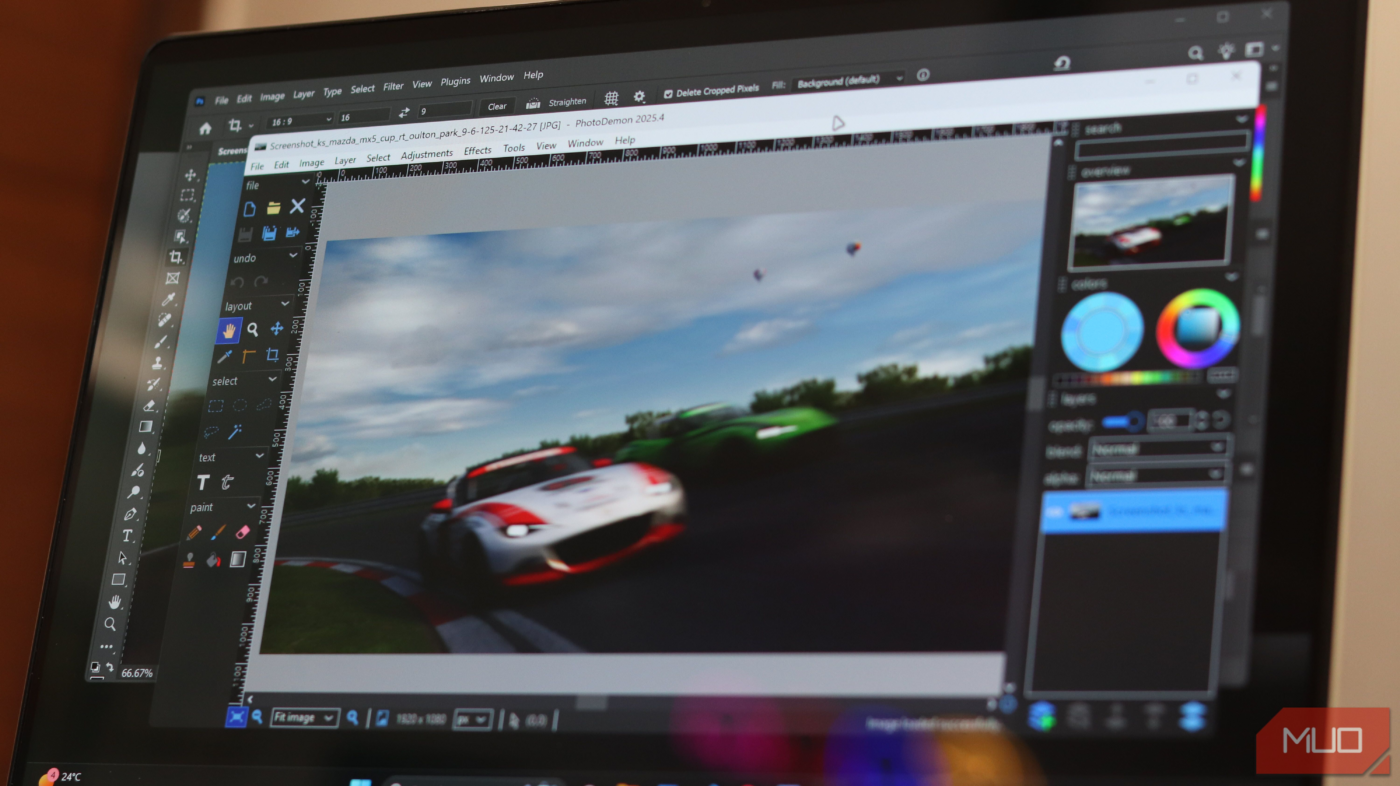
PhotoDemon is an open-source, completely free photo editing program for Windows that’s been in active development since 2012. Unlike several open-source projects you’ll come across on the internet, it’s not a side project or a hobby. It’s a serious tool built by developers who understand what photographers actually need. The entire application, with all of its features and functionality, weighs just 20.4 MB—hundreds of times smaller than Photoshop.
PhotoDemon is what’s called a portable application. It is Windows-only, but it doesn’t require an installation. You can just download a ZIP archive from the official website, extract it, and you’re ready to go. No registry entries, system dependencies, or administrator privileges required. It can live on a USB stick, sit on a portable drive, or even run from cloud storage if you want. Wherever you put it, it works exactly the same way.
It’s also not a glorified Paint replacement either. The program has over 200 editing tools built into it, including commonly used features like layers, masks, adjustment curves, content-aware fill, perspective correction, RAW file support, and even Photoshop PSD compatibility.
The project is completely open-source, meaning anyone can inspect the code, contribute improvements, or fork it if they want. There’s no business model trying to monetize you. No algorithms studying your behavior, and no AI features you don’t want. It’s a simple tool, built well, given away freely, and maintained by developers who genuinely seem to care about it.
- OS
-
Windows
- Price model
-
Free, Open-source
- Developer
-
Tanner Helland
PhotoDemon is a free, portable, open-source photo editor for Microsoft Windows.
Apart from the usual features you’d expect in a photo editor, PhotoDemon also offers incredible file support. As mentioned before, it can handle Photoshop’s PSD files, RAW camera formats, GIMP XCF files, HEIF/HEIC, JPEG-XL, AVID, and basically every major image format you’d throw at it. This is important because you can’t switch to an image editor if it is incompatible with the files you use. If all of your work is in PSD files, there’s no point looking for an alternative that won’t support those files in the first place.
You also get features like an integrated macro recorder and batch processor. You can record complex editing actions as macros and apply those later to an entire folder of images in just a few clicks. For anyone doing batch processing, this speeds up workflows significantly.
Color management is also great. It supports embedded ICC profiles and allows per-display color profile management. If you’re serious about photo editing, or if you’re doing any kind of color-critical work, this is important as it allows you to ensure your work is as color-accurate as possible.
The interface works well, too. Photoshop alternatives tend to have complicated interfaces that require at least some amount of effort before you can use them easily. PhotoDemon was built with usability in mind from the start. The toolbar is logical, the menus make sense, and there are real-time effect previews that show you what an effect will do to an image before applying it.

Last but not least, the performance is also generally great. Regardless of how lightweight a photo editing tool is, it usually does consume more memory when working with high-resolution images. PhotoDemon has a feature where it automatically suspends inactive images to disk. This lets you work with more images simultaneously without maxing out your system’s memory.
Good photo editing doesn’t need a subscription
Edit without cloud lock-ins or monthly bills
Photoshop is a great editor without a shadow of a doubt, and if you’re a professional using it daily, the subscription is likely worth it. But for everyone else, Adobe’s pricing is just too steep. Even editing with Gemini is better than Photoshop if you’re only touching up pictures once in a while.

Adobe has me locked down and I hate it
Adobe’s ecosystem has become a golden cage for creators—buggy tools, locked formats, endless fees, and no easy way out.
PhotoDemon won’t replace Photoshop for everyone. It’s more focused on photography than graphic design as well. Regardless, it can get most of Photoshop’s functionality without spending a dime. You can throw your entire editing toolkit on a USB drive, open PSD files, batch process hundreds of photos at once, and do near-professional color grading work without needing an absolute behemoth of a computer.
Maybe it isn’t as mainstream because it lacks the marketing budget of Adobe or the community of GIMP. Either way, if you’ve been stuck in Adobe’s subscription hell or frustrated with GIMP’s interface and complexity, PhotoDemon is an excellent alternative that deserves a shot.
source
Note: All product names, brands, and references in this post belong to their respective owners.
For more smart home guides, lifestyle tech updates, and UAE-focused recommendations, visit blog.thikra.co.
To shop smart gadgets, accessories, and lifestyle electronics, explore Thikra Store at thikra.co.






Leave a Comment