
Thikra Blog shares smart living tips, home gadget updates, and lifestyle technology insights tailored for UAE readers.
Every morning before doomscrolling, I’ve developed the habit of checking the weather. Nearly every time I head out, a vast blue sky greets me, only for rain to arrive halfway to my destination. But before I see the weather report, I have to work through a full-screen ad, tap a mute button on a video ad, and close a pop-up warning me that my Android phone is infected with a virus.
These ads are irritating and consume my time, resources, and data while loading. Lately, this has gotten worse. Every time I tap to view detailed weather information, I’m redirected to a website with more ads. The weather app has become more of an ad-serving billboard masquerading as a weather app. That is why I moved to an open-source weather app: Prism.

- OS
-
Android
- Developer
-
Bhanu7773-dev
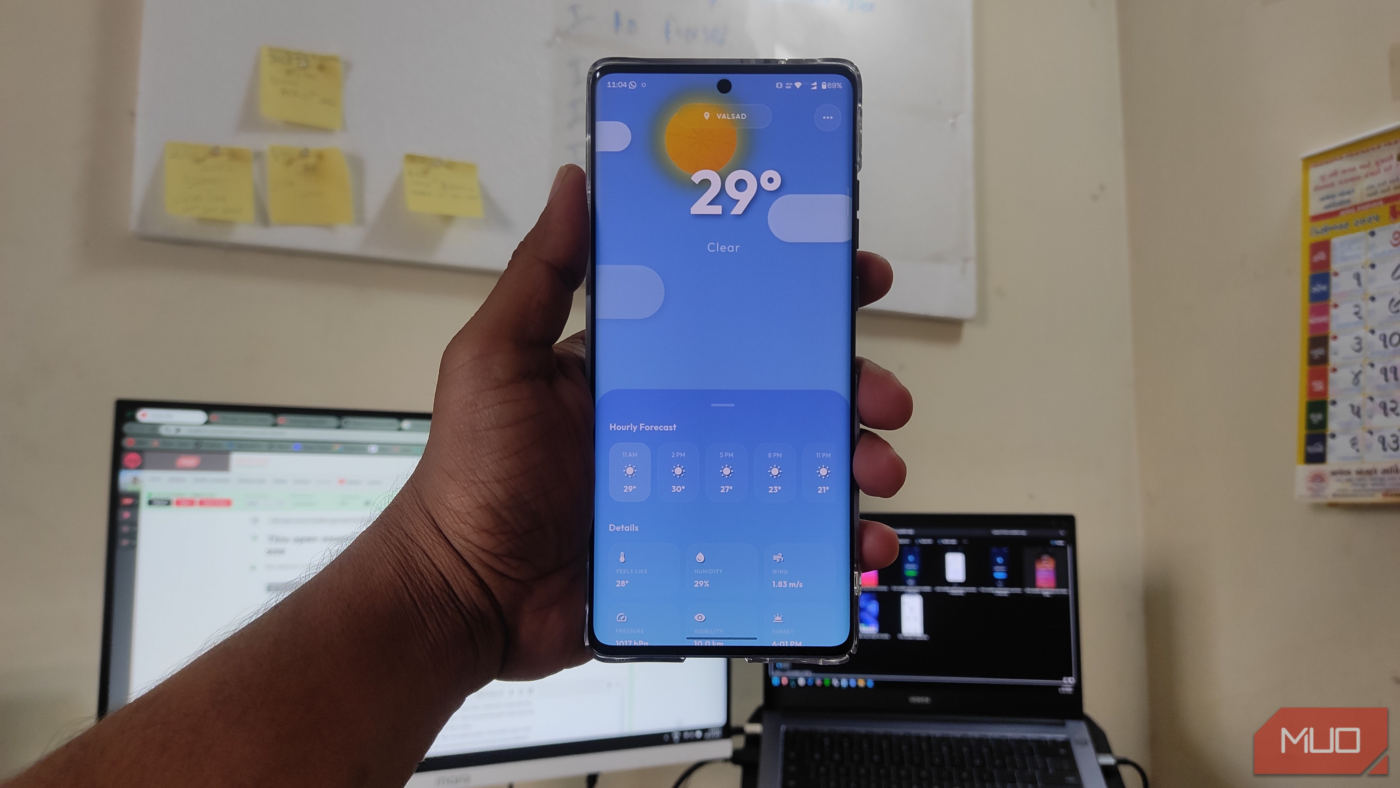
Prism is an open-source weather app built on flutter. It features an ad-free frosted glass design and a clean user interface.
Prism reminded me that you don’t have to put up with obtrusive apps to find useful ones. It’s not only useful, but also elegant, and doesn’t track your activity to serve as a monetization tool. It’s one of the best open-source Android apps I have come across this year.
Dynamic backgrounds and glassmorphism
A weather app that doesn’t blast you with stale, industrial design
The moment you open the Prism app, you’ll notice its glassmorphism design, rather than having to sit through an unskippable tutorial and 30-second ad. This style, marked by translucency, frosted-glass effects, and subtle gradients, gives the interface depth and hierarchy.
The text does not rest on a flat background; it floats on suspended panes resembling frosted glass. This design allows background colors to gently show through, without feeling harsh or disconnected. The real highlight is its dynamic weather background—unlike most apps with static images or icons, Prism generates a complete atmosphere.
Opening the app during a thunderstorm makes the screen darken as the background reflects the sky’s mood. If you check it at sunrise, a smooth gradient of orange and purple greets you. This approach not only looks appealing, but also serves a purpose: you can see what the weather is like outside before you’re fully awake.
A truly global weather app
Why should I be limited by location when it comes to seeing the weather?

Prism avoids a common pitfall of smaller open-source projects: location limitations. Thanks to its integration with robust OpenWeather Map APIs, it features a global city search.
Whether you’re tracking the weather in New York, Tokyo, or a small village in the Alps, the search function is snappy and accurate. It doesn’t struggle to find locations, which is often where non-commercial apps fall apart compared to giants like Google Weather.
What’s an Android app without accompanying widgets?

For Android users, the home screen is a sanctuary of customization, so a weather app lives or dies by the quality of its widgets. Prism has recently introduced a suite of five new widgets that bring the same glassmorphism design language directly to your launcher.
Crucially, these widgets respect the frosted aesthetic. They look fantastic against complex wallpapers because they blur the background, maintaining legibility while blending into your setup. If you are tired of the mismatched, opaque blocks that usually clutter Android home screens, these widgets are a massive upgrade brought to the relatively new app.
The Flutter factor and data sources
Will Prism slow your phone down?

Prism is built on Flutter, which gives it a beautiful look and enables animations across platforms. But there’s a cost. Like most Flutter apps, Prism includes its own rendering engine, which can make it larger than a native Kotlin app. Historically, Flutter can be slightly more taxing on the battery because it draws every pixel on the screen, rather than using standard system components.
We also have to factor in that, like many FOSS apps, Prism relies on OpenWeatherMap’s free API. While excellent, it doesn’t always have hyper-local data like Dark Sky (now owned by Apple) or the massive sensor network like The Weather Channel. If you require absolute precision for professional reasons—say, if you’re a farmer or sailor—the lag in update times for free APIs might be a deal-breaker compared to multi-million-dollar proprietary algorithms.

Why I Use This App Instead of the Default Weather App on Android
I always know when its sweater weather.
Not to mention, Prism is relatively new, so you might find many of the mainstream features missing. For example, Prism isn’t able to show weather maps. I like to check weather apps to keep track of forming hurricanes that may affect my routine.
If you don’t need professional-level precision, Prism remains one of the top open-source weather apps, even considering the Flutter factor. Most smartphones easily handle the rendering required by the app, and the battery impact from brief weather checks is minimal, especially compared to the drain from mainstream apps running lengthy video ads in the background.
You don’t have to watch an ad just to check the weather
With Prism, you get a premium, ad-free UI that rivals some of the best weather apps without paying a dime. The lag in data accuracy is often imperceptible for general use (like knowing whether you need a jacket or a raincoat). For those who want their phone to look futuristic and feel cohesive, Prism is the clear winner over the default bloatware. It proves that open-source doesn’t have to mean “ugly,” and utility doesn’t have to be boring.
source
Note: All product names, brands, and references in this post belong to their respective owners.
For more smart home guides, lifestyle tech updates, and UAE-focused recommendations, visit blog.thikra.co.
To shop smart gadgets, accessories, and lifestyle electronics, explore Thikra Store at thikra.co.






Leave a Comment