
Thikra Blog shares smart living tips, home gadget updates, and lifestyle technology insights tailored for UAE readers.
Google Photos continues to dominate photo and video cloud storage, thanks to its convenience, search capabilities, and efficient timeline. However, I’ve increasingly felt that the convenience has become more conditional. Storage limits are an issue, and some important features are locked behind a subscription wall. But above all, it’s unsettling how much of my personal data resides on servers over which I have no control.
So I set out to fix this. One solution I’ve turned to is self-hosting Immich. I saw it as a photo system that could exist for me without being optimized for engagement metrics or upselling. After living with this solution for a while, it’s proved to be fast and practical, and an ideal open-source alternative to Google Photos.
Hosting Immich was less intimidating than I expected
What my real-world setup looks like
Unlike Google Photos, Immich isn’t plug-and-play. However, configuring your self-hosted Immich isn’t a nightmare either. Running it on Docker makes it far easier, since Docker bundles the app, database, and background services into a predictable setup.
I have my server set up on Linux Mint, but it would work fine on Windows or macOS. You have to start by installing Docker using the default settings, then you can proceed with these steps:
-
Run the two commands below to create an Immich directory and navigate to it:
mkdir -p ~/immich-app
cd ~/immich-app -
Download the official maintained Docker setup for Immich with the command below. It gives you two files, “docker-compose.yml” and “.env”:
curl -o docker-compose.yml https://raw.githubusercontent.com/immich-app/immich/main/docker/docker-compose.yml
curl -o .env https://raw.githubusercontent.com/immich-app/immich/main/docker/example.env -
Run the command below to open the .env file:
nano .env
- Substitute the “UPLOAD_LOCATION” line with the text below, using the actual username for your computer user in place of “YOUR_USERNAME”: UPLOAD_LOCATION=/home/YOUR_USERNAME/immich-library
-
Create a new Immich folder with the command below:
mkdir -p ~/immich-library
-
Run the command below to start Immich:
docker compose up -d
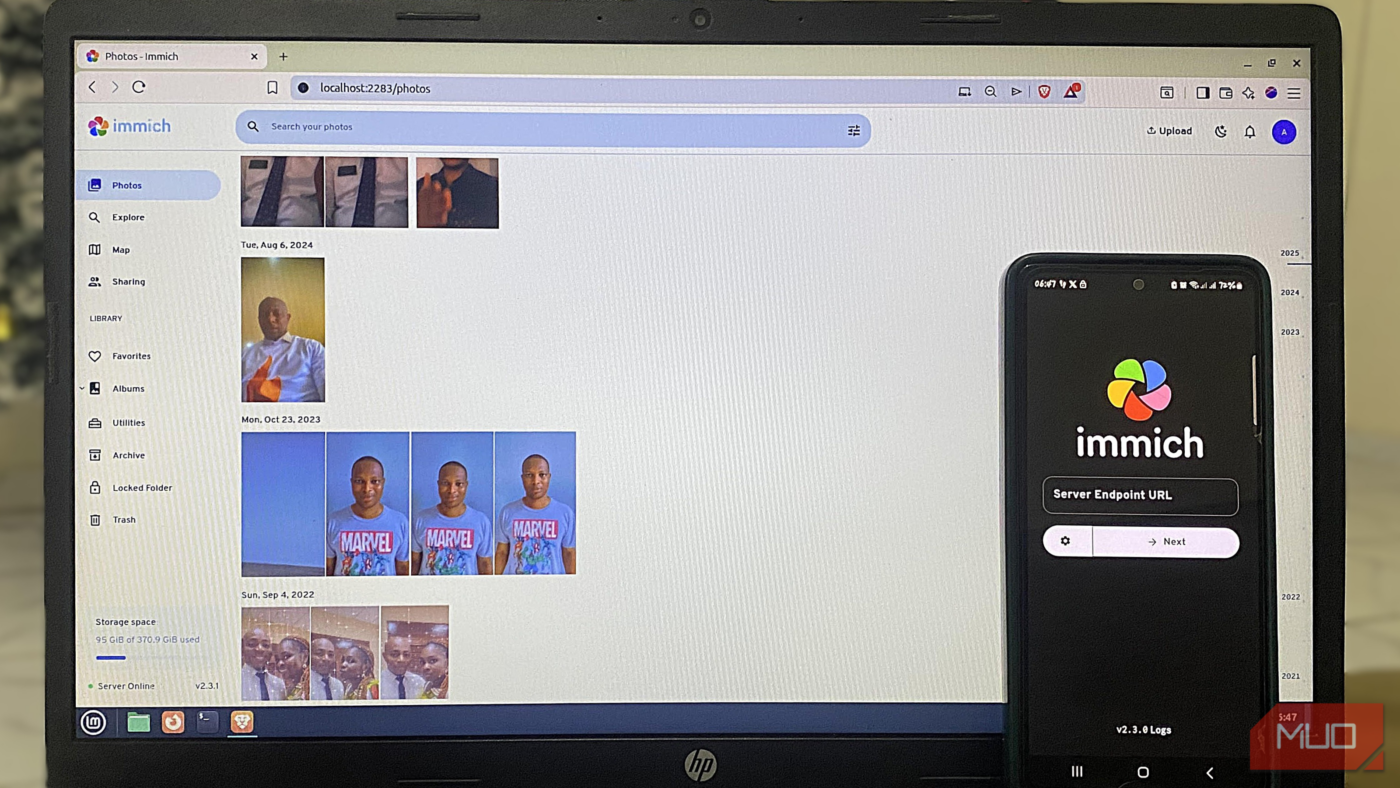
- Access Immich on your browser with the URL: http://localhost:2283
Once you follow these steps, you’ll be able to create an Immich account as a first-time user, log into the account, and begin configuring your theme.
But the interesting part is that you can connect to the Immich mobile app during the setup process and instantly begin backing up your files to your self-hosted Immich installation. The initial backup may take a while if you have a large photo or video repository. Immich will scan your library, extract metadata, generate thumbnails, and optionally run face recognition. After this one-time setup, day-to-day use is very lightweight.

- OS
-
Linux, Windows, macOS, Android, iOS
- Price model
-
Free
Immich is a self-hosted solution that allows you back up, organize, and manage your photos on your own server. It allows you to browse your photos and videos with ease and does not sacrifice privacy.
Performance is where Immich quietly pulls ahead
Local processing makes browsing and search feel instant

One of the biggest gains I noticed was the practical, day-to-day responsiveness of Immich. Scrolling was fluid and immediate, even on a repository that was about 150GB. The thumbnails appear instantly, and my timelines scrub smoothly. I did not get the tiny lags that I felt were normal when opening full-resolution images.
These are the advantages you get since Immich isn’t waiting for some distant data center, battling network latency, or sharing bandwidth with millions of users. Since all my photos live on my local server, queries hit the local database, and the server CPU does the heavy lifting. Once the library grew, even self-hosted options like PhotoPrism, which I had used in the past, felt heavier than Immich.
Of all the benefits, search responsiveness stands out the most. I filter by date, camera metadata, and location, and it all feels snappy. This only makes sense because Immich is not re-fetching anything and does not need to wake up.
Smart photo organization without sending your memories to the cloud
Face recognition, object detection, and metadata—all on your server

Privacy was one of the biggest reasons I started looking for Google Photos alternatives. Some alternatives I tried were great at protecting privacy, but not smart enough to be a direct replacement. That is where Immich beats them all: it has face recognition, object detection, and semantic search, and these run locally. It automatically clusters faces, and the moment you label these clusters, it takes recognition accuracy to another level. This is very much like Google Photos, just without cloud dependency.
I find its object detection accurate across common categories such as pets, vehicles, documents, and landscapes. It’s less accurate for some categories, but still transparent and consistent. I can see when jobs run; I can pause them, and in some cases, I reprocess data according to my hardware needs.
When compared to Google, I find Immich’s ML more straightforward, mainly because it is limited to my actual device and not a hyperscale AI platform I know nothing about. The trade-off is that it may be slightly less accurate, but I can live with this.
Immich fits into my existing storage and backup strategy
It organizes photos without owning them

A little underrated feature of Immich is that it can handle internal libraries as well as external ones, and this includes read-only modes. This feature allows it to index all photos without pushing you into any proprietary storage structure.
So, even though my photos are visible on disk, I can access them outside Immich and perform backups with standard tools, though I prefer to stick with open-source options like BorgBackup. This option, along with a few others, is perfectly independent of Immich and would work even when Immich is not running or operational.
This is a point where several hosted services simply do not thrive. As great as Google Photos is, you will face headaches when you want to leave. The fact that Immich does not lock your data into a proprietary format makes it a safer option.
That said, Immich rewards ownership and isn’t free in the same way Google Photos is. You are responsible for updates, storage planning, and you don’t get support if drives fail or a service crashes. This is typically the cost of going open-source.
Hosting my photos changed how I value them
Aside from replacing Google Photos, Immich has opened me up to a new relationship with my photo library. Speed and privacy are not abstract benefits; they now feel more tangible.
This switch has been more about choosing ownership than rejecting convenience. While it has its drawbacks, Immich’s performance, transparency, and longevity make it the better option.
source
Note: All product names, brands, and references in this post belong to their respective owners.
For more smart home guides, lifestyle tech updates, and UAE-focused recommendations, visit blog.thikra.co.
To shop smart gadgets, accessories, and lifestyle electronics, explore Thikra Store at thikra.co.











Leave a Comment